 NeoBit Daily

Introduction
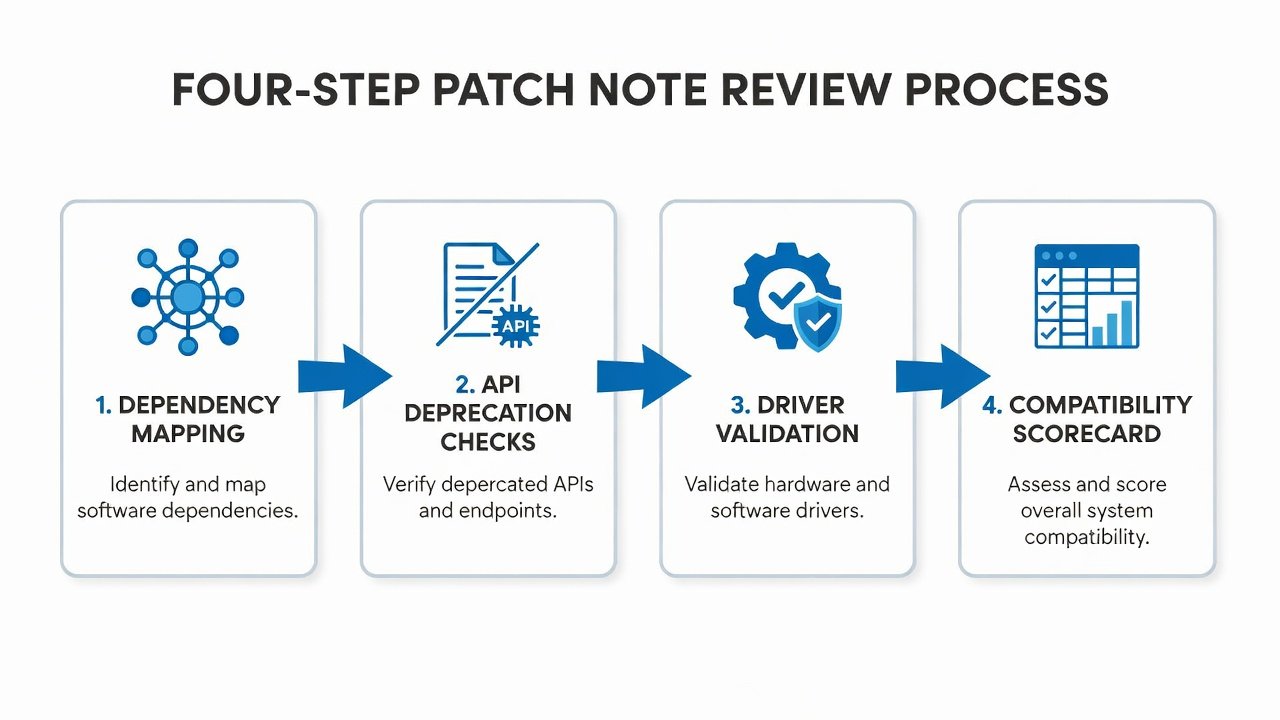
In 2026, software updates continue to evolve at a rapid pace, introducing compatibility changes that can silently disrupt enterprise workflows across multiple operating systems. IT teams and power users must treat patch notes as an early-warning system rather than reactive documentation. This comprehensive guide outlines a repeatable four-step review process focused on dependency mapping, API deprecation checks, hardware driver validation, and scorecard creation to catch issues proactively before they impact daily operations. Organizations that implement these practices experience fewer unplanned outages and maintain higher productivity levels throughout the year. The methods described apply equally to Windows environments running mission-critical applications, macOS devices used in creative and development teams, and Linux servers powering cloud infrastructure. By focusing on prevention instead of remediation, teams can allocate resources more efficiently and avoid the costly scramble that follows unexpected breaks in established workflows. This approach transforms routine patch reviews into strategic activities that protect business continuity.
Readers will find detailed explanations of each step along with platform-specific considerations, real-world examples drawn from recent enterprise updates, and guidance on building internal processes that scale with organizational needs. The emphasis remains squarely on identifying risks during the review phase so that mitigation plans can be prepared in advance.
Why Proactive Patch Note Analysis Matters in 2026
Enterprise environments rely on interconnected systems where a single overlooked change can cascade into major failures affecting hundreds of users. Patch notes from major vendors often highlight compatibility fixes that affect legacy applications, custom scripts, or specialized hardware without always making the downstream impact immediately obvious. Ignoring these details leads to unexpected outages, especially when updates target security vulnerabilities that alter underlying behaviors in subtle ways. For instance, changes to memory management or network stack implementations may only surface after full deployment when specific workloads trigger edge cases. Proactive scanning turns release notes into actionable intelligence that allows teams to test targeted scenarios rather than performing broad, time-consuming validations. Teams that implement structured reviews report fewer post-update incidents and smoother rollout cycles across mixed operating system fleets. This methodology also supports compliance requirements by creating documented evidence of due diligence before changes are introduced into production.
The Four-Step Compatibility Review Process
Follow this structured methodology for every major and minor release from key vendors. The process is platform-agnostic yet easily adaptable to the unique characteristics of Windows, macOS, and Linux.
Step 1: Dependency Mapping
Begin by cataloging all software, libraries, and services that interact with the updated component. Create a visual map using tools like dependency graphs available in your existing infrastructure management platform or open-source alternatives. Identify version-specific requirements and note any third-party integrations that might break under new conditions. For Windows environments, pay particular attention to .NET framework updates and registry dependencies. On macOS, examine framework linkages and app sandbox entitlements. Linux teams should focus on shared library versions and container base image compatibility. Document every connection point so that testing can prioritize high-risk interactions first. This mapping exercise often reveals hidden dependencies that were not apparent during initial system design.
Step 2: API Deprecation Checks
Scan release notes for any deprecated or removed APIs and cross-reference these against your codebase using automated scanning tools where possible. Pay special attention to endpoints that handle authentication, data serialization, or network protocols because these areas tend to cause the most visible disruptions. Microsoft frequently documents API changes in their Windows release notes and provides migration paths that teams can evaluate in advance. Similar documentation exists for macOS through developer resources and for Linux distributions through kernel changelogs. Create a tracking spreadsheet that lists each deprecated API, the affected internal code, and the estimated effort required for updates. Schedule follow-up reviews to confirm that migration work is progressing on schedule.
Step 3: Hardware Driver Validation
Validate all critical drivers against the new OS versions in a controlled staging environment that mirrors production configurations. Test printers, network adapters, storage controllers, and specialized peripherals under realistic workloads. Linux users should check kernel module compatibility and rebuild instructions for custom modules. macOS teams must review driver extensions for notarization requirements and potential changes to system extension policies. Windows administrators should verify signed driver status and test any custom INF files. Maintain a hardware inventory spreadsheet that includes driver versions currently in use and the minimum acceptable versions after the update. This step prevents situations where critical peripherals become unusable immediately after deployment.
Step 4: Building the Compatibility Scorecard
Compile findings into a simple yet comprehensive scorecard that rates each item as low, medium, or high risk. Include columns for affected systems, estimated business impact, required testing effort, and recommended mitigation steps. This living document becomes the foundation for go/no-go decisions during change advisory board meetings. Update the scorecard as new information emerges from testing and share it with stakeholders to maintain alignment. A well-maintained scorecard also serves as historical reference for future update cycles, helping teams identify patterns in recurring compatibility challenges.
Real-World Examples from Recent Enterprise Updates
Consider a recent Linux kernel update that modified container networking behavior, requiring adjustments to custom orchestration scripts after teams performed thorough dependency mapping. A macOS point release deprecated an older graphics API, forcing creative agencies to update rendering pipelines ahead of deployment deadlines. On the Windows side, an enterprise security patch altered how certain authentication libraries handled token expiration, which only became apparent after dependency mapping revealed connections to internal single-sign-on systems. These cases demonstrate how early detection prevents costly rollbacks and maintains user confidence in IT change management processes. Each example underscores the value of applying the four-step process consistently rather than relying on informal reviews.
Common Pitfalls to Avoid
- Skipping the scorecard step and relying on memory alone, which leads to inconsistent application across different teams.
- Overlooking minor version changes that still impact legacy software running in production environments.
- Failing to test hardware in realistic load conditions that reflect actual daily usage patterns.
- Ignoring cross-platform implications when managing mixed environments that span Windows, macOS, and Linux.
- Delaying reviews until just before scheduled deployment windows, leaving insufficient time for mitigation planning.
Downloadable Compatibility Checklist
Teams can create their own checklist based on the four-step process. Include dedicated sections for each operating system, risk rating scales, mitigation action items, and sign-off fields for both technical reviewers and business stakeholders. Store the checklist in a shared repository with version control so that updates to the process are tracked and previous versions remain accessible for audit purposes. The checklist should also contain prompts for rollback trigger conditions and escalation contacts.
Frequently Asked Questions
What triggers a full rollback plan?
High-risk items on the scorecard with no viable workaround or insufficient testing coverage should trigger rollback preparation. Monitor test environments closely during staged deployments and establish clear criteria for when to activate the rollback sequence. Document these criteria in advance so that decisions can be made quickly without extended debate during an incident.
How often should reviews occur?
Conduct full reviews for every major and minor release from primary vendors. Schedule quarterly audits of ongoing compatibility risks even when no new patches are imminent. This regular cadence helps surface gradual drift in dependencies that might otherwise go unnoticed until a breaking change appears.
Can automation replace manual checks?
Automation assists with scanning large codebases and generating initial dependency maps, but human review remains essential for interpreting business impact and nuanced deprecation notices that require contextual judgment. Combine both approaches for optimal results.
How should mixed environments be handled?
Prioritize the operating system that supports the largest number of critical workflows first, then apply lessons learned to secondary platforms. Maintain separate scorecards per operating system while also creating a consolidated view for leadership reporting.
Conclusion
Turning 2026 patch notes into an early-warning system empowers IT teams to maintain stable workflows across Windows, macOS, and Linux. By consistently applying the four-step process of dependency mapping, API deprecation checks, hardware driver validation, and scorecard development, professionals stay ahead of compatibility challenges. Start implementing this methodology with your next update cycle to minimize disruptions and build organizational resilience that supports long-term operational excellence.

No comments yet. Be the first!