 NeoBit Daily

Introduction to Zero-Trust in 2026 OS Updates
Zero-trust architecture continues to shape enterprise security in 2026. IT teams must extract actionable tactics directly from operating system patch notes and release documentation for Windows, macOS, and Linux distributions. This guide provides a structured approach to identifying authentication enhancements, network segmentation improvements, and access control fixes across major vendors. Organizations adopting these tactics early see improved resilience against lateral movement attacks and unauthorized access attempts. The principles of verify explicitly, least privilege access, and assume breach form the foundation, and 2026 updates embed many of these controls at the operating system layer rather than requiring separate overlays.
By focusing on these updates, teams can strengthen defenses without major infrastructure overhauls. Real-world deployments demonstrate that systematic review of patch notes reduces implementation time by aligning new features with existing policies. The following sections outline practical evaluation methods, compatibility considerations, and measurable outcomes observed in production environments across industries such as finance, healthcare, and manufacturing.
Scanning Patch Notes for Key Zero-Trust Changes
Effective zero-trust implementation begins with systematic review of release notes. Focus on three primary areas: authentication mechanisms, network segmentation updates, and granular access controls. Teams should dedicate time each patch cycle to parse vendor documentation line by line, noting any mentions of identity, encryption, or traffic control.
Authentication Changes
Windows 2026 updates emphasize passwordless authentication and conditional access policies integrated at the kernel level. For instance, new Group Policy options allow automatic enforcement of phishing-resistant MFA for all domain-joined devices. macOS introduces enhanced biometric verification tied to device posture checks, including real-time checks against Apple’s secure enclave. Linux distributions such as Ubuntu and Fedora have expanded support for hardware-backed keys via TPM 2.0 modules and improved integration with systemd for just-in-time credential issuance.
Network Segmentation Updates
Recent patches enable micro-segmentation at the OS level. For example, Windows now supports native east-west traffic isolation through updated firewall rules that can be managed via PowerShell scripts. macOS adds containerized network namespaces that isolate application traffic by default. Linux kernel updates improve eBPF-based policy enforcement, allowing administrators to define fine-grained rules that inspect packets without performance penalties. These features help contain breaches by limiting lateral movement between workloads.
Access Control Fixes
Vendors have addressed privilege escalation vulnerabilities and introduced just-in-time access features. These changes align with NIST zero-trust guidelines and reduce the attack surface in mixed environments. Additional fixes include stricter default permissions on shared resources and automated revocation of stale tokens.
Four-Step Evaluation Process
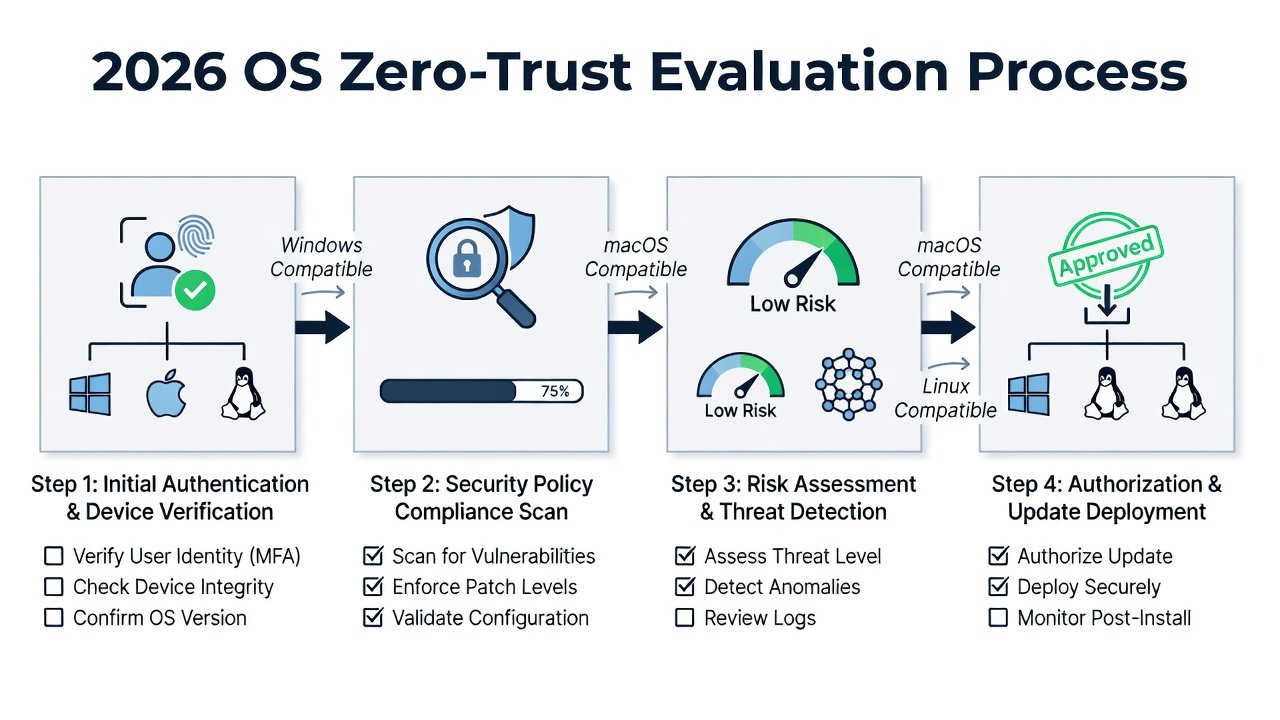
IT teams should follow this repeatable process when reviewing 2026 OS updates. The process ensures no critical changes are missed and that each update supports broader zero-trust goals.
- Inventory current OS versions and identify relevant patch notes from official vendor portals. Create a spreadsheet tracking build numbers, release dates, and security categories.
- Map each security change to zero-trust pillars: verify explicitly, use least privilege, and assume breach. Highlight any feature that enables continuous verification or dynamic access decisions.
- Test changes in a staging environment for compatibility with existing identity providers and monitoring tools. Simulate common attack scenarios to validate new controls.
- Document expected security gains and create rollback procedures before production deployment. Include metrics such as reduced authentication failures or blocked connection attempts.
Compatibility Checks for Existing Tools
Before rollout, validate integration with SIEM platforms, endpoint detection solutions, and identity management systems. Common issues arise when legacy agents do not support new authentication protocols introduced in 2026 updates. For example, older versions of some EDR tools may flag new Windows conditional access events as false positives until signatures are updated.
Use vendor compatibility matrices and conduct proof-of-concept deployments lasting at least two weeks. Teams often discover that macOS updates require updated MDM profiles to enable biometric posture checks, while Linux environments need kernel module recompilation for certain eBPF features. Document all required configuration changes in a shared knowledge base to speed future cycles.
Cloud vs On-Prem Implementation Differences
Cloud-hosted workloads benefit from native zero-trust controls embedded in hypervisors and managed services. On-premises deployments require more manual configuration of network policies and certificate-based authentication. Hybrid setups demand consistent policy enforcement across both models. Windows Azure Arc and similar bridging tools help synchronize access rules between environments, ensuring the same least-privilege policies apply whether a workload runs in Azure or on local hardware.
Cloud environments often provide built-in logging that simplifies auditing, whereas on-prem teams must configure additional forwarding to central SIEM instances. Understanding these differences prevents gaps during migration projects.
Common Pitfalls to Avoid
- Overlooking certificate lifecycle management during authentication upgrades, which can cause widespread outages when certificates expire unexpectedly.
- Applying network segmentation without updating monitoring dashboards, leading to blind spots where traffic is blocked but never reported.
- Ignoring user training on new access workflows, which can increase helpdesk tickets and user frustration during the first month after deployment.
- Skipping phased rollouts and attempting full deployment in a single maintenance window, raising the risk of widespread disruption if an incompatibility surfaces.
Real-World Examples from Major Vendors
Consider a financial services firm that applied Windows 2026 passwordless policies across 5,000 endpoints. After mapping patch notes to their existing conditional access framework, they achieved a 40 percent reduction in credential-based incidents within 60 days. A healthcare provider using macOS updates isolated clinical applications via network namespaces, preventing potential lateral movement from compromised research workstations. Linux administrators at a research institution leveraged new eBPF capabilities to enforce per-container firewall rules, aligning with their multi-tenant zero-trust model.
Checklists and Quick-Reference Tables
| Step | Windows | macOS | Linux |
|---|---|---|---|
| Authentication | Enable passwordless via Hello and conditional policies | Update Touch ID policies and posture checks | Configure FIDO2 keys and systemd integration |
| Segmentation | Apply firewall micro-segments via PowerShell | Use network namespaces for apps | Deploy eBPF policies with bpftool |
| Access Control | Implement JIT privileges and token revocation | Enforce app sandboxing defaults | Harden sudo rules and capability drops |
Additional checklists should cover pre-deployment validation, post-deployment monitoring, and quarterly policy reviews. Maintain separate checklists for cloud and on-prem environments to account for differing configuration surfaces.
Monitoring and Maintenance Post-Rollout
After deployment, establish continuous monitoring of zero-trust controls. Use built-in OS logging combined with centralized SIEM correlation to detect policy violations quickly. Schedule monthly reviews of patch notes to incorporate any follow-up fixes released by vendors. This ongoing process ensures the zero-trust posture remains effective as new threats emerge.
Measurable Security Gains
Organizations applying these tactics report reduced lateral movement incidents and faster detection of anomalous access attempts. Regular audits of 2026 OS updates help maintain alignment with evolving threats while minimizing operational overhead. Teams that document baseline metrics before changes can clearly demonstrate improvements in access success rates and blocked unauthorized connections.
Conclusion
Zero-trust principles embedded in 2026 operating system updates provide IT teams with powerful, built-in tools. By systematically evaluating patch notes, verifying compatibility, and following structured rollout processes, teams can achieve stronger security postures across Windows, macOS, and Linux environments. Consistent application of these tactics delivers lasting protection without requiring entirely new platforms.


No comments yet. Be the first!