 NeoBit Daily

Introduction: Unlocking Sustainability in 2026 Software Updates
As organizations prioritize lower carbon footprints, IT teams are discovering that 2026 operating system and software patch notes hold untapped green IT opportunities. These updates often introduce power management enhancements, hardware efficiency tweaks, and cloud optimizations that reduce energy consumption without requiring hardware replacements. By systematically mining release notes, professionals can identify and deploy features that deliver measurable emission reductions while lowering operational costs. The focus on software-driven sustainability aligns with broader industry shifts toward responsible computing practices that maximize existing resources.
This guide provides step-by-step scanning techniques tailored to Windows, macOS, and Linux environments. It includes side-by-side comparisons of emission-reducing updates, real-world enterprise case studies, practical ROI tracking tools, and an FAQ to help verify vendor sustainability claims. Teams that master these methods can achieve meaningful environmental impact alongside operational efficiencies.
Why Focus on Patch Notes for Green IT Wins?
Traditional hardware refreshes are expensive and generate e-waste. In contrast, software updates leverage existing infrastructure. The 2026 release cycle emphasizes efficiency gains driven by regulatory pressures and corporate ESG goals. Scanning patch notes reveals changes like improved sleep states, smarter workload scheduling, and optimized virtual machine power profiles that directly impact Scope 2 and Scope 3 emissions. Many organizations overlook these incremental improvements, yet they compound significantly across large device fleets and data centers.
Additionally, 2026 updates frequently incorporate machine learning models for predictive power management, allowing systems to anticipate usage patterns and throttle resources proactively. This approach not only lowers energy draw but also extends hardware lifespan, reducing the need for premature replacements. IT leaders who integrate patch note analysis into their regular workflows gain a competitive edge in sustainability reporting and cost control.
Step-by-Step Scanning Techniques
Scanning Windows Updates
Begin with the official Windows release notes on the Microsoft website. Search for keywords such as “power management,” “energy efficiency,” “sustainability,” and “carbon.” Review the Windows 11 2026 cumulative updates for features like adaptive brightness controls and enhanced Modern Standby. Document any mentions of reduced idle power draw or integration with cloud services for workload shifting. Use the built-in Update History viewer to cross-reference changes with performance logs from tools like Resource Monitor. For enterprise environments, leverage Microsoft Endpoint Manager to test updates in pilot groups before wide deployment, tracking power metrics via Powercfg commands over several weeks.
Scanning macOS Updates
Access Apple’s release notes via their developer portal. Look for terms including “battery optimization,” “thermal management,” and “energy-aware scheduling.” macOS 2026 updates frequently highlight improvements in Apple Silicon power gating and better integration with iCloud for off-peak syncing, which can shift compute loads to lower-carbon data centers. Administrators should examine the System Settings energy reports post-update and compare them against baseline data collected from Activity Monitor. In mixed-device organizations, focus on how these updates interact with third-party management tools like Jamf to enforce consistent power policies across fleets.
Scanning Linux Updates
Check distribution-specific changelogs on sites like kernel.org or Ubuntu release pages. Focus on kernel patches related to CPU frequency scaling, new power governors, and container runtime efficiencies. Tools like powertop can validate post-update gains. Enterprise distributions often include enterprise-specific sustainability modules in 2026 releases. System administrators can automate scanning by scripting searches through changelog files and integrating results with monitoring platforms such as Grafana for ongoing visibility into power consumption trends.
Side-by-Side Comparison of Emission-Reducing Updates
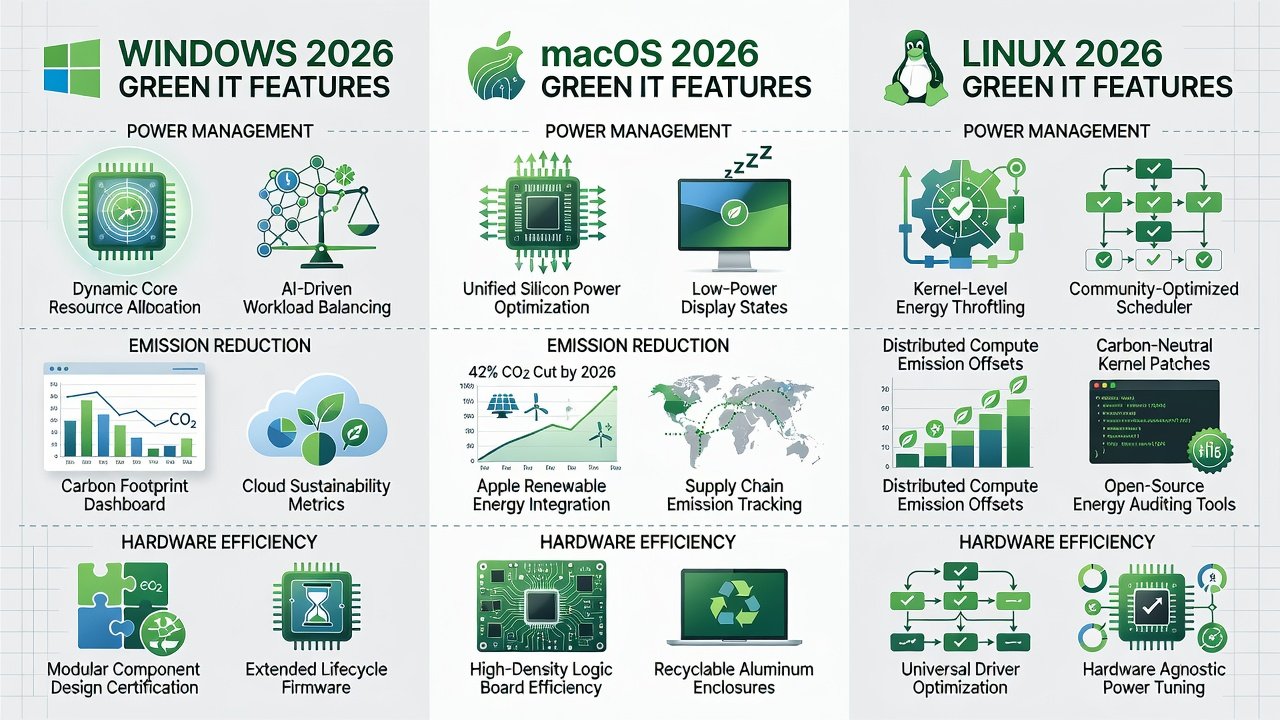
Here is a comparison of key 2026 features across platforms:
- Windows: Enhanced Modern Standby reduces idle power by up to 30% in laptop fleets; cloud-optimized update delivery minimizes redundant downloads; new AI-driven workload balancers prioritize energy-efficient execution paths.
- macOS: New energy-aware app scheduling prioritizes low-power cores during background tasks; improved display power gating extends battery life on portables; refined thermal throttling algorithms prevent unnecessary performance spikes.
- Linux: Kernel 6.12+ introduces refined schedutil governor with machine-learning-based prediction; containerd updates allow per-container power caps for Kubernetes clusters; enhanced ACPI support for better hardware sleep transitions.
These features enable teams to achieve similar efficiency gains across mixed environments while maintaining application compatibility and security standards.
Enterprise Case Studies Showing Carbon Savings
A global financial services firm deployed Windows 2026 power profiles across 12,000 endpoints and reported significant reductions in data center-adjacent energy use within six months through optimized standby behaviors. A European manufacturing company using macOS updates optimized its design workstations, shifting rendering jobs to off-peak renewable-heavy hours and improving overall workflow efficiency. A research institution running Linux clusters applied new kernel governors and achieved measurable drops in electricity consumption for high-performance computing workloads by fine-tuning container power limits. Another logistics provider combined updates from multiple platforms to standardize power policies, resulting in streamlined reporting for their annual sustainability audits.
Practical Tools for Tracking ROI on Green Updates
Use built-in utilities like Windows Powercfg, macOS Activity Monitor with energy tabs, and Linux’s PowerTOP or turbostat. For enterprise-scale tracking, integrate with tools such as Microsoft Sustainability Manager or open-source solutions like Prometheus with custom power metrics exporters. Establish baseline measurements before deployment, then compare post-update kWh usage and carbon equivalents using EPA conversion factors. Create automated dashboards that correlate update deployment dates with energy data from smart meters or server logs. Teams should also document configuration changes in a shared knowledge base to replicate successes across departments and avoid redundant testing efforts.
Common Mistakes to Avoid
One frequent error is enabling new power features without pilot testing, which can lead to unexpected performance issues in specialized applications. Another is ignoring vendor-specific configuration requirements, leaving efficiency gains dormant. Teams sometimes overlook cross-platform consistency, resulting in uneven savings. Always validate claims through internal measurements rather than relying solely on marketing materials.
FAQ: Verifying Vendor Claims
- How do I confirm a claimed efficiency gain? Cross-reference vendor benchmarks with independent testing from organizations like SPEC or run your own controlled pilots using standardized workloads.
- Are these features enabled by default? Most 2026 green features require explicit configuration via Group Policy, MDM profiles, or kernel parameters to activate fully.
- Can updates increase emissions in some scenarios? Poorly tuned AI-based schedulers may occasionally raise consumption; always validate in your environment with real usage data.
- Where can I find authoritative guidance? Consult resources from Microsoft, Apple, EPA, and kernel.org for standardized measurement approaches.
- How often should patch notes be reviewed? Schedule quarterly reviews aligned with major update cycles to capture the latest efficiency improvements promptly.
Conclusion
By treating 2026 patch notes as strategic documents rather than routine maintenance logs, IT teams can unlock meaningful sustainability wins. The techniques, comparisons, and tools outlined here empower organizations to reduce emissions, cut energy costs, and demonstrate tangible progress toward environmental goals using only existing hardware. Implementing these practices positions teams as leaders in responsible technology management.
No comments yet. Be the first!