 NeoBit Daily
Telegram 2026: Channels, Bots & Privacy Mastery Guide
Telegram has grown into one of the most versatile messaging platforms available in 2026, offering tools that support everything from casual chats to large-scale community management and automated business workflows. This in-depth guide walks beginners and intermediate users through account creation, channel building, bot development, and advanced privacy settings. Whether you want to launch a public news channel, automate team notifications, or lock down your conversations with military-grade encryption, the following sections provide actionable steps and real-world examples to help you succeed.
Getting Started with Telegram Account Setup
Download the latest version of the Telegram app directly from the official website at telegram.org for your mobile device or desktop. Registration requires only a valid phone number, after which you receive a one-time verification code. Once inside the app, navigate to Settings and immediately enable two-step verification by creating a strong password. This extra layer prevents account takeovers even if someone gains access to your SMS messages. Next, customize your profile by adding a clear photo and username, then review the default privacy options for who can call you or add you to groups. For users focused on productivity, enable notifications for specific folders and sync your contacts so you can quickly locate colleagues or community members.
Creating and Managing Telegram Channels
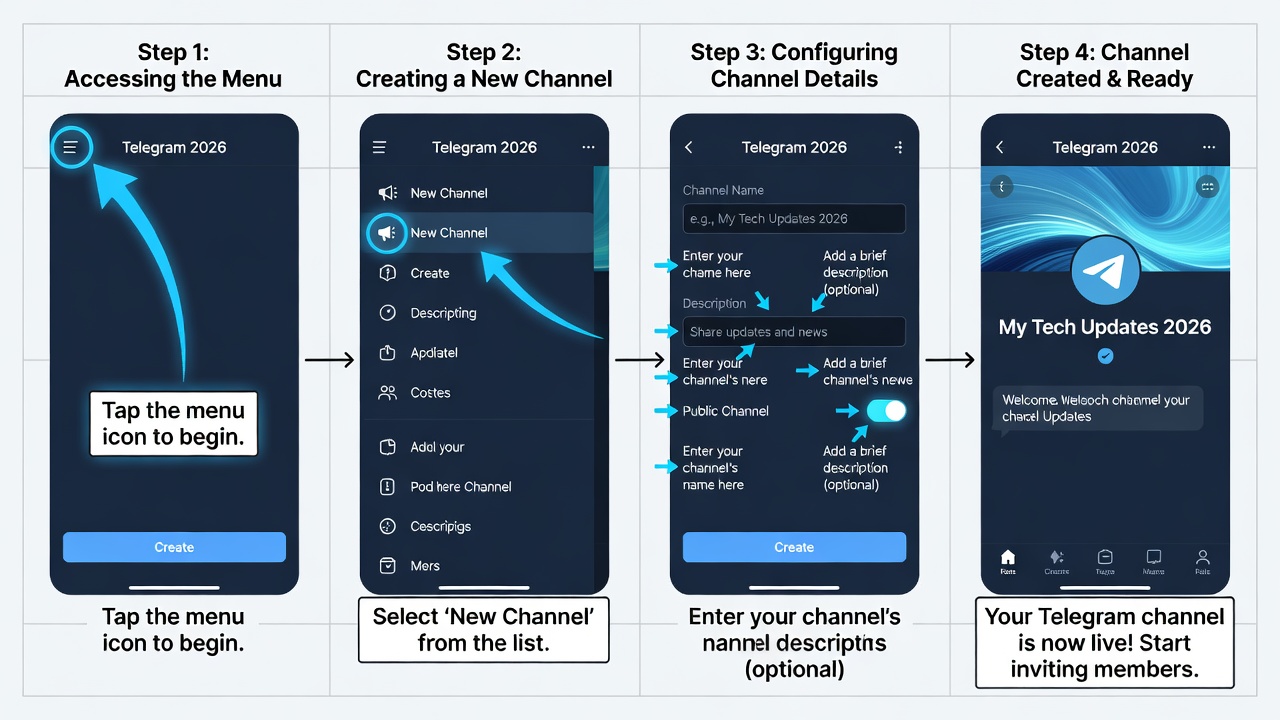
Channels function as one-way broadcast tools perfect for sharing updates with thousands of subscribers. Open the app, tap the compose button, and select New Channel. Give it a memorable name, add a concise description that includes relevant keywords, and choose a public username such as @YourProjectUpdates. Upload a professional logo and cover image to increase visual appeal. After creation, generate an invite link and share it across social media or email lists. To grow your audience, post consistently using the scheduling feature, which lets you prepare content days in advance. Organize content with topics if your channel covers multiple themes, and monitor subscriber analytics available in the channel info panel to see which posts perform best. Many creators also pin important messages at the top so newcomers instantly see rules or welcome information.
Integrating Bots with Practical Examples
Bots transform Telegram into a powerful automation hub. Start by messaging @BotFather to create a new bot and receive its unique API token. One popular use case involves a weather bot: connect the bot to an external API and program simple commands like /forecast that return current conditions for any city. Another example is a task reminder bot that stores user deadlines in a lightweight database and sends daily summaries at 8 AM. For community managers, a poll bot allows quick audience feedback on upcoming features or events. Developers can extend these capabilities using the python-telegram-bot library by writing handlers for inline queries and callback buttons. Always keep your bot token secret and store it in environment variables rather than hard-coding it into scripts. Testing in a private group before public deployment helps catch bugs early.
Advanced Privacy Controls and Security Features
Secret chats deliver end-to-end encryption with optional self-destruct timers ranging from one second to one week. Initiate one by opening a contact profile and selecting New Secret Chat. Two-step verification, already mentioned during setup, should be paired with regular reviews of active sessions under Privacy and Security settings. You can revoke access from any suspicious device instantly. Additional controls let you hide your phone number from non-contacts, disable forwarding of your messages, and set who can see your last seen status. In group chats, enable slow mode to reduce spam and use admin rights to remove disruptive members quickly. For maximum protection, combine these features with a VPN when connecting from public networks.
Automating Workflows with Telegram
Integrate bots with external services to create seamless productivity systems. Use platforms like Zapier to forward new channel posts directly into Google Sheets or Slack. A practical workflow might involve a bot that receives support tickets via inline commands and automatically creates corresponding entries in a project management tool. Step-by-step, obtain your bot token, set up webhook endpoints on a secure server, and define triggers such as keyword detection in messages. Communities often employ these automations for welcome messages, FAQ responses, and event reminders, freeing moderators to focus on high-value interactions rather than repetitive tasks.
Telegram vs Slack and Discord Comparisons
- Security: Telegram’s MTProto protocol and secret chats provide strong encryption options, whereas Slack emphasizes compliance certifications and Discord prioritizes voice encryption for gaming communities.
- Scalability: Public channels can reach millions of subscribers without performance issues, unlike Slack’s typical workspace size limits or Discord’s server member caps.
- Customization: Telegram bots offer extensive API flexibility for custom commands, while Slack apps focus on enterprise integrations and Discord bots excel mainly in entertainment features.
- Cost: Core Telegram functionality stays free, making it attractive for growing communities compared to paid tiers often required for advanced Slack usage.
Common Mistakes to Avoid
New users frequently leave privacy settings at defaults, exposing personal information unnecessarily. Always test bot tokens in private environments before exposing them publicly. Another pitfall involves poor channel organization; create separate folders for work, personal, and hobby chats to maintain clarity. Avoid sharing invite links in unrelated forums, as this can attract spam. Finally, remember to update your bot code regularly to match API changes and keep dependencies secure.
Practical Tips for Productivity and Community Building
Organize chats into custom folders labeled Projects, News, and Friends for quick navigation. Use inline bots for instant searches inside conversations without leaving the app. For community growth, host regular voice chats and pin summaries afterward. Encourage member participation by running themed contests or AMAs that leverage the poll feature. When building bots, document every command clearly so users know exactly what to type. These small habits compound over time, turning Telegram into a central hub for both personal efficiency and vibrant online groups.
FAQ
How do I recover a lost Telegram account? Use the recovery email associated with two-step verification or reach out through the in-app support form.
Can bots read my secret chats? No, secret chats remain encrypted and inaccessible to any third-party bots.
What are the best practices for growing a Telegram channel in 2026? Post valuable content consistently, share your link across relevant platforms, and engage with subscribers through polls and comments.
Is Telegram suitable for business teams? Yes, especially when combined with bots for task automation and folders for project separation.
How often should I review active sessions? Check at least once per month or immediately after any suspected security incident.
Can I use Telegram without a phone number long-term? A phone number is required for initial signup, though you can later hide it from others.
For further reading, consult the official resources at Telegram and the Telegram Bot API documentation. Privacy-focused guidance is also available from the Electronic Frontier Foundation.
Conclusion
Mastering Telegram in 2026 means combining its native tools with thoughtful automation and strong privacy habits. By following the steps outlined above, you can build thriving channels, deploy reliable bots, and keep your communications secure. Start small with account setup and one channel, then gradually layer in bots and advanced controls. The platform rewards users who invest time in learning its full feature set, delivering both convenience and peace of mind.

No comments yet. Be the first!