 NeoBit Daily

Introduction to Linear for Modern Product Teams
In 2026, efficient issue tracking and roadmap planning remain critical for product teams delivering value at speed. Linear has matured into a premier platform featuring advanced AI capabilities, intuitive interfaces, and robust collaboration tools tailored for product managers and developers. This in-depth guide walks through every essential aspect of Linear, from initial workspace configuration to sophisticated automation and integrations. Whether you are migrating from another tool or optimizing an existing Linear setup, the following sections provide actionable steps, real-world examples, and best practices to streamline your workflows.
Getting Started with Linear Setup in 2026
Begin your Linear journey by signing up for a workspace directly on the platform. Once created, customize your organization settings to reflect team structure, including departments and access permissions. Invite collaborators via email or SSO integration, assigning roles such as admin, member, or guest. Next, establish foundational projects aligned with your product lines or initiatives. For instance, a mobile app team might create separate projects for iOS, Android, and backend services. Define issue templates early to standardize inputs; a bug report template could include fields for reproduction steps, severity level, and environment details, while a feature request template prompts for user impact and acceptance criteria. This structured approach reduces ambiguity and accelerates triage from the outset.
Building Custom Views for Better Visibility
Custom views serve as the backbone of daily operations in Linear, enabling teams to surface relevant issues instantly. Start by navigating to the views panel and selecting filters such as status, assignee, priority, or custom labels. A product manager might create a high-priority roadmap view that displays only issues marked for the current quarter, grouped by component. Developers can benefit from assignee-specific views showing open tasks sorted by due date. Experiment with board layouts versus list views depending on whether your team prefers kanban-style visualization or detailed tables. Save these configurations and share them across the workspace for consistent access. Over time, refine views based on feedback; for example, adding a cycle filter helps focus sprints on active work while archiving resolved items to maintain clarity.
Leveraging AI Suggestions for Issue Prioritization
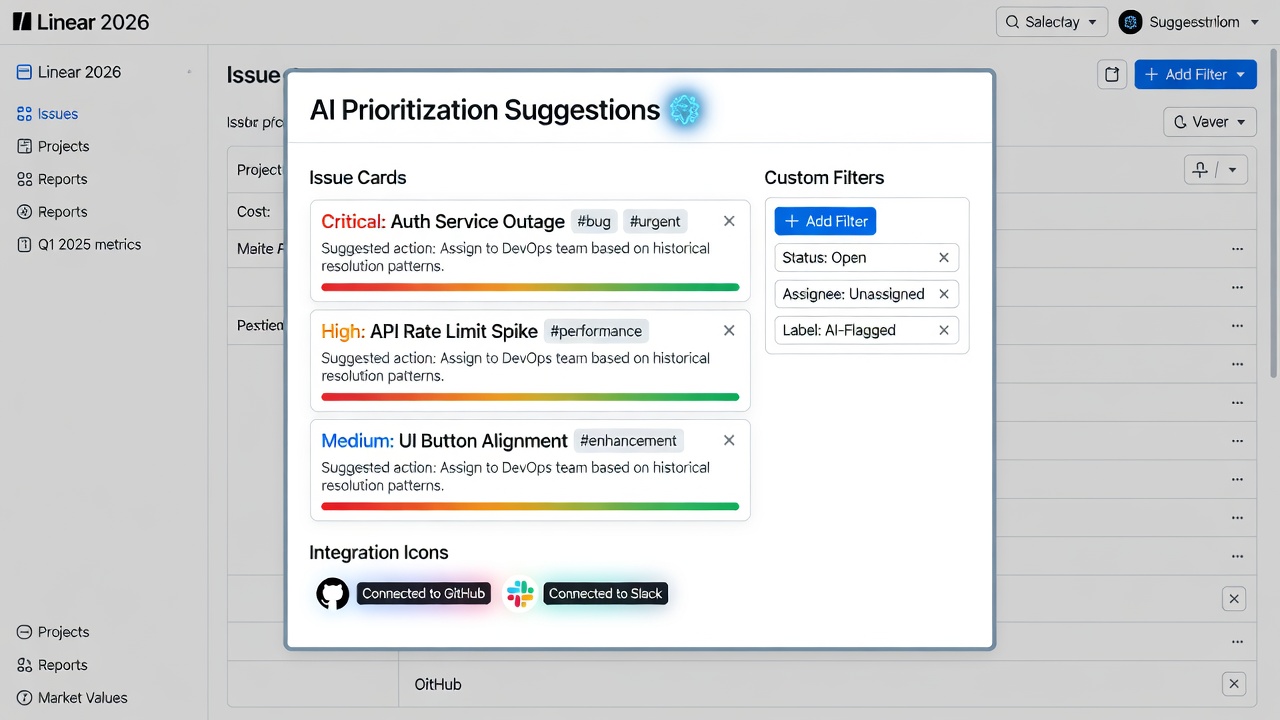
Linear's 2026 AI engine analyzes issue content, historical velocity data, and dependency graphs to generate intelligent prioritization recommendations. When creating a new issue, the system evaluates factors like blocking relationships and team capacity before suggesting a priority tier. Consider a scenario where a critical security patch is logged: the AI may automatically elevate it above feature work if it detects related open vulnerabilities from the prior cycle. Product teams should review these suggestions during weekly planning meetings, adjusting as needed based on strategic shifts. To maximize value, train the model implicitly by consistently updating issue metadata and completing cycles on schedule. This feedback loop improves accuracy over successive weeks, turning AI into a reliable co-pilot rather than an occasional helper.
Automating Workflows with Rules
Automation rules eliminate manual overhead and enforce process consistency. Access the automation builder from workspace settings and define triggers paired with actions. A practical example involves label-based assignment: when an issue receives the 'frontend' label, it routes automatically to the designated frontend lead. Another rule might transition status to 'In Review' the moment a linked GitHub pull request is opened. For cross-team coordination, configure notifications that alert specific channels when high-priority items remain untouched for 48 hours. Test each rule in a staging project before enabling it organization-wide. Monitor execution logs regularly to identify and refine any rules causing unintended side effects, ensuring automations enhance rather than disrupt productivity.
Integrating Linear with GitHub and Slack
Seamless integrations connect Linear to the rest of your development ecosystem. Begin with GitHub by authorizing the Linear app in your repository settings; once linked, commits and pull requests sync bidirectionally, updating issue status without leaving the code environment. For Slack, install the Linear bot and map channels to specific projects so that new issues or status changes appear as threaded messages. This setup supports real-time awareness; a developer can comment on an issue from Slack, and the update propagates back to Linear instantly. Explore additional options such as webhook endpoints for custom scripts if your stack includes other services. These connections reduce context switching and keep all stakeholders informed through familiar interfaces.
Further enhance connectivity by exploring Linear's API documentation for bespoke automations. For teams already invested in Atlassian products, note that Linear's lighter footprint often accelerates adoption compared with heavier enterprise alternatives.
Creating and Managing Roadmaps
Roadmaps translate raw issues into strategic narratives for leadership and customers. Construct one by selecting multiple projects and grouping issues under milestones with target dates. Add visual progress indicators that calculate completion percentages automatically as issues move through statuses. Update the roadmap bi-weekly after cycle reviews, incorporating new priorities while removing completed work. For external communication, generate shareable links with view-only permissions. Advanced users can layer in dependencies to highlight critical paths, preventing overlooked blockers from derailing quarterly goals. Regular roadmap reviews foster alignment and surface resource needs early.
Team Collaboration Best Practices
- Conduct daily standups by projecting a shared cycle view, allowing quick identification of blockers and reassignments.
- Encourage threaded comments on every issue to preserve decision history and reduce scattered email threads.
- Share tailored custom views with cross-functional partners to promote transparency without granting full edit access.
- Document key decisions directly within issue descriptions or linked documents so future team members can trace rationale easily.
- Establish labeling conventions upfront, such as consistent use of 'needs-design' or 'blocked' tags, to improve searchability across the entire workspace.
Linear vs Jira: A 2026 Comparison
Linear distinguishes itself through speed and simplicity, whereas Jira excels in highly regulated environments requiring intricate workflows and compliance reporting. Linear's interface loads faster and requires less initial configuration, leading to quicker team onboarding. Jira provides deeper customization for enterprise-scale hierarchies but can introduce complexity that slows smaller product teams. In 2026, many agile organizations choose Linear when velocity matters most, while retaining Jira for legacy systems demanding extensive audit trails. Evaluate both by piloting a single project before committing fully.
Common Pitfalls and FAQ
How do I handle large backlogs in Linear?
Archive resolved issues on a monthly cadence and leverage powerful search operators to isolate active work. Regularly groom the backlog during dedicated sessions to remove outdated requests.
Can AI suggestions be overridden?
Absolutely. Team members retain full control; AI serves as a starting point that you refine with domain knowledge and stakeholder input.
What if integrations fail?
Verify API tokens and re-authenticate the connected applications through the integration settings page. Check network permissions if your organization uses strict firewalls.
How often should roadmaps be updated?
Align updates with your cycle cadence, typically every two weeks, to reflect accurate progress without creating notification fatigue.
By implementing the strategies outlined above, your product team can unlock Linear's full potential throughout 2026 and maintain a competitive edge in issue tracking and roadmap execution.

No comments yet. Be the first!