 NeoBit Daily

Introduction to Prompt Engineering in ChatGPT 2026
In 2026, the ChatGPT mobile app stands as a cornerstone productivity tool for professionals, students, and creatives seeking to streamline daily tasks. Advanced prompt engineering turns simple queries into sophisticated workflows covering email drafting, research summarization, and creative brainstorming. This comprehensive guide delivers practical, mobile-specific strategies that guide beginners toward becoming power users, complete with real examples, step-by-step tutorials, and comparisons.
The evolution of ChatGPT has emphasized mobile accessibility, allowing users to leverage AI anywhere. Effective prompts reduce time spent on repetitive tasks while improving output quality. Whether managing a busy inbox or outlining a project, mastering these techniques yields measurable efficiency gains.
Understanding Chain-of-Thought Prompting on Mobile
Chain-of-thought prompting directs the AI to reason through problems sequentially, producing more accurate and detailed responses. On the mobile app, this method excels for on-the-go decision making where screen space limits lengthy interactions. A strong example prompt reads: "Analyze the steps to prepare a quarterly business report. Think step by step: first identify key metrics, then gather data sources, then structure the executive summary, and finally suggest visualizations."
Before applying this technique, responses often appear generic and incomplete. After refinement, users receive structured plans with logical flow and actionable items. Mobile users benefit by dictating the initial prompt via voice and reviewing outputs during commutes. Experiment with adding constraints such as "limit each step to 50 words" to keep answers concise for small screens.
Setting Up Custom GPTs for Personalized Productivity
Custom GPTs function as specialized assistants within the app. To create one, open the GPT builder section, assign a clear role such as "You are an expert email drafter focused on professional tone and brevity," upload relevant files like style guides, and iterate through test conversations. This setup proves invaluable for recurring workflows like client communications or meeting summaries.
Advanced users combine multiple instructions to handle edge cases, such as incorporating company-specific terminology. Once saved, the custom GPT appears in your mobile library for instant access. Regular updates to instructions keep the assistant aligned with changing priorities. For deeper customization guidance, consult resources on the OpenAI official site.
Optimizing Voice Mode for Hands-Free Workflows
Voice mode in the 2026 ChatGPT app supports fluid, natural dialogue ideal for multitasking. Begin with prompts like "Help me brainstorm blog ideas while I walk; ask clarifying questions after each suggestion." Speak at a measured pace, pause after complex requests, and follow up with refinements such as "Expand the third idea with pros and cons."
Optimization tips include using headphones to reduce background noise, testing different accents for better recognition, and combining voice with quick text edits afterward. This mode particularly enhances creative brainstorming sessions where ideas flow faster verbally than typed. Users report smoother integration into routines like cooking or driving when prompts guide the conversation proactively.
Integrating ChatGPT with Other Mobile Apps
Seamless integration multiplies productivity. Use built-in shortcuts to send ChatGPT outputs directly to email clients or note apps. For instance, generate a research summary then export it via the share sheet to your preferred document tool. Advanced setups involve API connections through automation platforms for tasks like auto-populating calendars from AI-generated schedules.
Always verify permissions and test small workflows first. Mobile-specific considerations include handling offline caching of prompts and ensuring data privacy during transfers. Over time, these connections create a unified ecosystem that minimizes app switching.
Real-World Examples with Before-and-After Comparisons
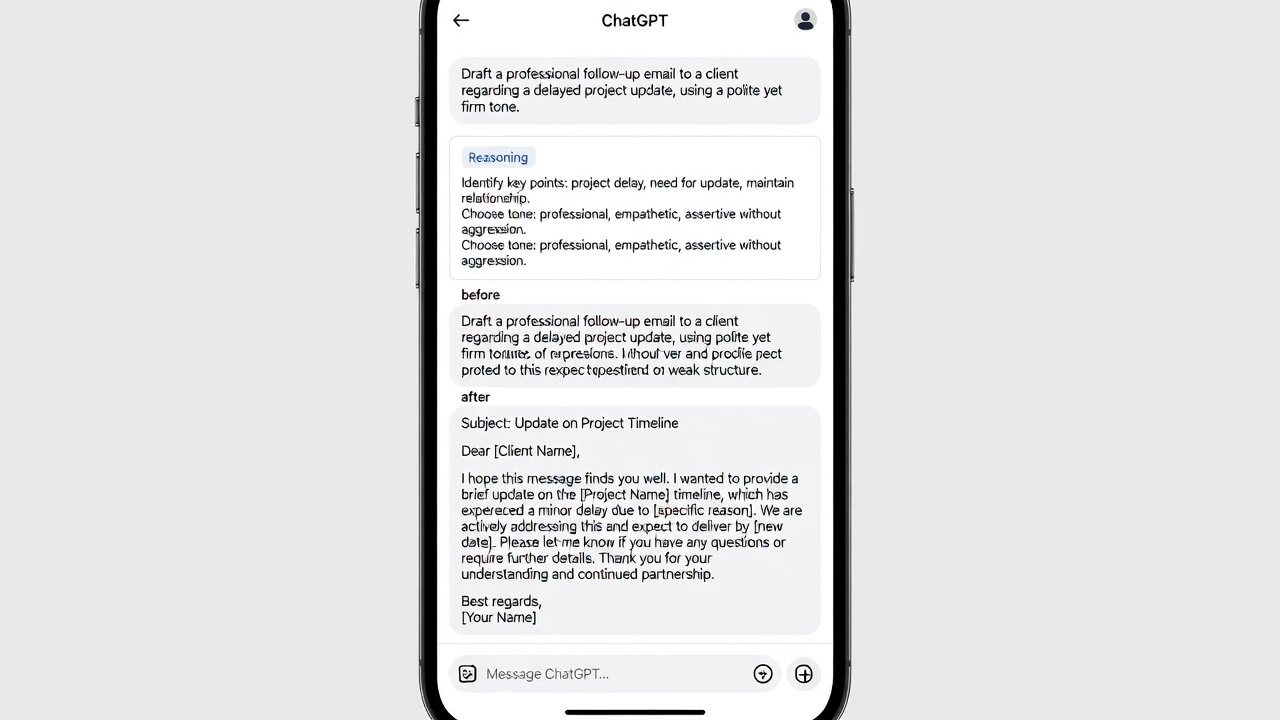
Practical application reveals dramatic improvements. For email drafting: a basic prompt yields a short, informal message, while an advanced version produces a polished draft with subject line, bullet points, and call to action. Research summarization transforms from scattered facts into categorized insights with source references. Creative brainstorming shifts from one generic concept to a ranked list of five ideas complete with implementation steps.
Additional scenarios include project planning where chain-of-thought yields timelines versus vague overviews, and learning new skills through guided explanations versus surface-level definitions. Track your own before-and-after results in a dedicated note to refine future prompts.
Step-by-Step Tutorials for Mobile Power Users
Follow these tutorials to build expertise gradually. First tutorial: email drafting. Open a new chat, input a detailed prompt including recipient context and desired tone, review the output, then request revisions such as "Make it more concise." Second tutorial: research summarization. Paste article text, add instructions like "Extract five key takeaways and suggest follow-up questions," then save the result.
Third tutorial covers creative brainstorming with voice mode. Activate voice, state the topic, request structured output, and iterate verbally. Fourth tutorial focuses on custom GPT creation as described earlier. Practice one tutorial daily to internalize the patterns.
Mobile-Specific Tips and Advanced Techniques
- Use templates stored in your notes app for quick prompt insertion.
- Leverage dark mode and text size adjustments to review long outputs comfortably.
- Combine prompts with device features like split-screen for simultaneous reference.
- Apply few-shot examples by including two sample responses in your prompt for consistent style.
- Experiment with role-playing prompts such as "Act as a senior manager reviewing this proposal."
These techniques accelerate progression from basic use to advanced mastery.
Common Pitfalls and How to Avoid Them
Many users encounter vague outputs from imprecise prompts. Counter this by adding specifics like length, audience, and format. Over-reliance on default settings leads to repetitive answers; vary temperature-like parameters if available or rephrase frequently. Mobile limitations such as smaller keyboards encourage voice input, yet always proofread for accuracy. Ignoring follow-up refinement misses opportunities for depth.
FAQ
How long does it take to master prompt engineering? Consistent daily practice typically produces noticeable improvements within two to four weeks, with power-user proficiency emerging after two months.
Is voice mode reliable for complex professional tasks? Yes, when prompts include clear structure and follow-up requests for clarification.
Can these techniques work offline? Core generation requires an internet connection, though saved prompts and previous outputs remain accessible.
What distinguishes beginner prompts from advanced ones? Advanced prompts incorporate reasoning chains, examples, constraints, and iterative instructions.
Conclusion
Mastering prompt engineering in the ChatGPT mobile app unlocks substantial productivity gains across workflows. By applying chain-of-thought methods, custom GPTs, voice optimization, and integrations, users transform everyday tasks into efficient processes. Begin with the tutorials provided, track results, and refine continuously. The techniques outlined here support long-term growth from novice to expert in the evolving landscape of mobile AI assistance. For ongoing updates, explore the OpenAI official site.


No comments yet. Be the first!