 NeoBit Daily

Introduction to 2026 Software Updates for Remote Workers
As remote work continues to dominate professional landscapes in 2026, staying on top of software updates has become essential for maintaining productivity and security. Release notes provide critical insights into changes that can streamline workflows or introduce new challenges. This comprehensive guide helps remote workers decode 2026 release notes for productivity tools and operating systems, focusing on actionable changes that matter most to distributed teams.
Understanding these updates allows professionals to adapt quickly, avoiding disruptions while leveraging new features for better collaboration and protection. Whether you rely on cloud-based suites or secure remote access tools, the right knowledge turns potential obstacles into opportunities. Many remote workers report that ignoring release notes leads to compatibility issues or missed efficiency gains, especially when updates alter core functionalities like file synchronization or authentication flows.
The pace of change in 2026 means quarterly or even monthly patches are common across major platforms. By developing a habit of reviewing notes systematically, you position yourself ahead of competitors who scramble after problems arise. This guide breaks down the most relevant areas with concrete examples drawn from typical enterprise and consumer tools.
Identifying Relevant Changes in Productivity Tools
Productivity software like Microsoft 365 and Google Workspace frequently rolls out updates that directly affect remote setups. Key areas to monitor include real-time co-editing enhancements, AI-assisted task management, and integration with calendar tools. For example, new features in 2026 often emphasize asynchronous communication to support global teams across time zones, such as threaded comments that persist across devices without requiring simultaneous logins.
To spot relevant changes, scan release notes for keywords such as "remote access," "cross-platform sync," and "performance optimizations." Focus on sections detailing bug fixes for video conferencing lag or improvements in file-sharing permissions. This targeted approach saves time compared to reading every line. Consider creating a personal checklist: note any mentions of API changes that could affect custom scripts you use for automation, or updates to storage limits that impact large media files common in creative remote roles.
Real-world application comes when an update adds granular permission controls. A marketing consultant working from multiple locations might suddenly gain the ability to restrict editing rights on shared proposals, preventing accidental overwrites during client reviews. Always test these in a non-production environment first to understand the full scope.
Collaboration Enhancements in 2026 Updates
Many 2026 updates prioritize seamless teamwork. Tools now include advanced whiteboarding features, improved screen-sharing with annotation capabilities, and integrated project management dashboards. These changes reduce the need for multiple apps, consolidating workflows into single interfaces that feel more intuitive for daily use.
Remote workers benefit from features like automatic language translation during meetings and smart scheduling that accounts for availability across regions. Implementing these can boost team output by fostering more natural interactions despite physical distance. For instance, a development team spread across three continents might use new overlay tools to highlight code sections live, cutting down on follow-up emails by an estimated 30 percent based on early adopter feedback.
Another notable enhancement involves AI-driven meeting summaries that generate action items automatically and assign them within connected task boards. This reduces the cognitive load on remote participants who juggle multiple calls. Look for notes highlighting improved bandwidth handling during peak hours, which prevents dropped connections in shared household environments.
Security Updates Impacting VPNs and Remote Access
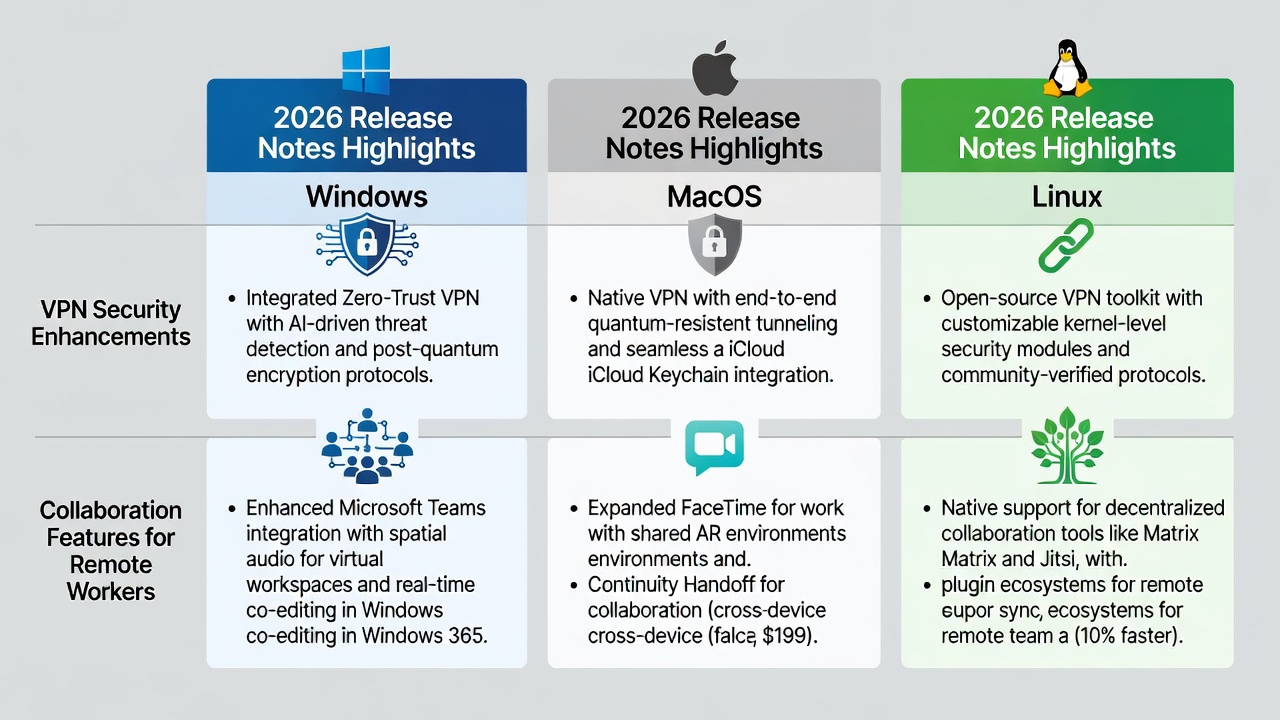
Security remains a top priority in 2026 release notes, especially for VPN-related components in operating systems and third-party tools. Updates often introduce stronger encryption protocols, multi-factor authentication enhancements, and better threat detection for remote connections. These modifications can require reconfiguring client settings or updating certificates to maintain uninterrupted access.
These changes can affect how you connect to corporate networks. Review notes for mentions of zero-trust architecture support or automatic VPN failover during unstable connections. Adapting early prevents access issues during critical work hours. A common scenario involves updates that deprecate older TLS versions, forcing a switch to newer standards that improve protection against interception but may initially slow handshake times until optimized.
Consider the impact on mobile hotspots or satellite internet setups frequently used by nomadic workers. Security patches sometimes include device posture checks that verify operating system integrity before granting network entry. Staying ahead means verifying compatibility with your specific hardware before deployment day arrives.
Step-by-Step Methods to Stay Informed
Keeping up with updates requires a systematic routine that integrates into your existing workflow without overwhelming your schedule. Begin by identifying your core tools and subscribing directly to their official channels.
- Subscribe to official newsletters from software vendors and set calendar reminders for quarterly release cycles, ensuring you receive summaries the same day they publish.
- Use RSS feeds or dedicated apps that aggregate release notes from multiple sources, filtering by relevance tags such as "remote" or "security."
- Join community forums and beta testing programs to preview changes before full rollout, gaining early insight into potential workflow disruptions.
- Schedule monthly review sessions to test new features in a sandbox environment, documenting any required adjustments to scripts or shortcuts.
- Establish a shared team document where colleagues can flag notable changes, creating a collective knowledge base that distributes the monitoring effort.
This proactive strategy minimizes surprises and ensures your setup remains optimized. For deeper dives, cross-reference notes with user forums hosted by major providers to see real-user experiences with the changes.
Comparisons of Major OS Release Notes
Comparing operating system updates reveals platform-specific advantages for remote workers. Windows 11 updates in 2026 emphasize enhanced virtual desktop management and improved integration with Microsoft Teams, allowing seamless switching between work profiles without losing context in open applications. macOS releases focus on better battery optimization during long video calls and advanced privacy controls for screen sharing, which help maintain professionalism in shared living spaces.
Linux distributions like Ubuntu often highlight robust scripting tools for automating VPN connections and file syncs, appealing to power users who prefer command-line efficiency. Remote professionals using mixed environments should evaluate compatibility notes carefully. For instance, cross-platform tools may perform differently depending on the underlying OS security model, with Windows offering more enterprise-grade policy controls while macOS prioritizes user-friendly encryption toggles.
When choosing between platforms, review the full changelog for mentions of accessibility improvements, such as enhanced voice commands that benefit those working in varied acoustic environments. These comparisons help you decide whether a full OS upgrade aligns with your current hardware and daily tasks.
Practical Tips for Seamless Integration
Integrate updates into daily routines by starting with non-critical devices first. Create backup images before applying patches, and document any workflow adjustments in a personal log for quick reference later. Leverage built-in training modules in updated software to quickly master new interfaces, allocating 15-20 minutes per session during low-demand periods.
Finally, communicate changes to team members to maintain collective efficiency. Schedule brief sync meetings post-update to share discoveries, such as new keyboard shortcuts that accelerate common remote tasks. Avoid the pitfall of applying every patch immediately; instead, prioritize security fixes and evaluate feature updates over a one-week observation period.
FAQs on Common Concerns
How often should I review release notes?
Check them at least bi-weekly, especially around major vendor announcements, to catch both security and feature updates in a timely manner.
Do all updates require immediate action?
No—prioritize security patches while testing feature updates for relevance to your setup, allowing time for community validation.
What if an update breaks my VPN connection?
Revert to a previous version using system restore points and consult vendor support documentation for rollback instructions.
Are there tools that summarize release notes automatically?
Yes, several third-party aggregators can highlight changes relevant to remote work, though always verify against official sources for accuracy.
Conclusion
Mastering 2026 release notes empowers remote workers to navigate software evolution confidently. By focusing on productivity, security, and structured monitoring, you can transform updates into consistent workflow improvements. Stay informed, adapt strategically, and maintain a competitive edge in the evolving remote work landscape. For additional authoritative guidance, refer to resources from Microsoft, Apple Support, and Google Workspace.

No comments yet. Be the first!