 NeoBit Daily
Introduction to Daily Cyber Hygiene in 2026
As digital threats continue to evolve in 2026, establishing consistent daily cyber hygiene habits has become one of the most effective ways for individuals to safeguard their personal information and maintain robust data privacy. This beginner-friendly guide delivers practical, actionable advice focused on everyday routines rather than complex enterprise frameworks. Readers searching for real security improvements will find concrete steps covering email management, device maintenance, browsing safety, and password strategies, all designed to minimize exposure to phishing, malware, ransomware, and unauthorized access attempts that dominate current threat reports.
Understanding why these habits matter starts with recognizing that most breaches stem from small, repeated oversights rather than sophisticated attacks. By building simple daily practices, you create multiple layers of defense that make it significantly harder for attackers to succeed. This approach empowers users to take control without requiring advanced technical skills or expensive subscriptions.
Email Hygiene Routines
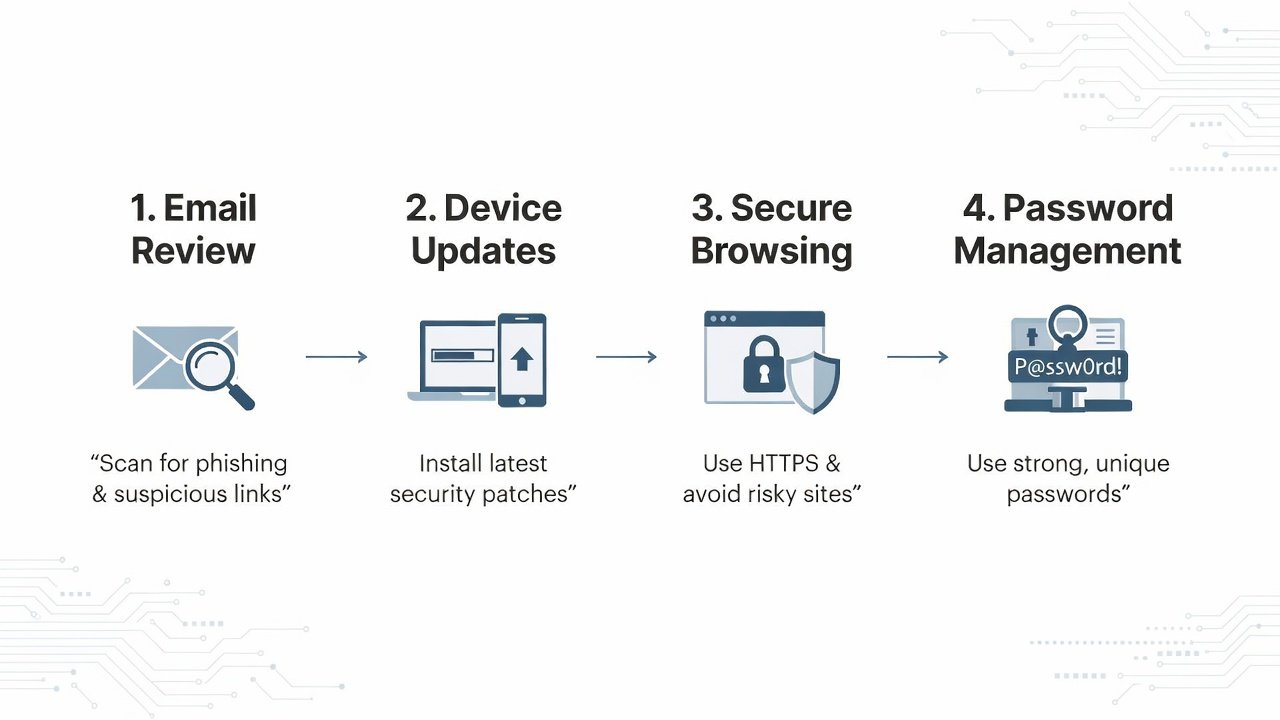
Begin each morning by scanning your inbox methodically before opening any messages. Prioritize verifying the sender's address against known contacts and avoid clicking embedded links or downloading attachments from unexpected sources. Instead, navigate directly to official websites or use phone verification for sensitive requests. Implement email filters to automatically sort newsletters and promotions into separate folders, reducing inbox clutter and the chance of missing important alerts. Enable two-factor authentication on every email account and review connected apps regularly to revoke unnecessary permissions. Common oversights include forwarding chain emails or responding to urgent-sounding requests without confirmation, which have led to account takeovers in numerous documented cases.
Device Update Protocols
Make device maintenance a non-negotiable part of your routine by enabling automatic updates across smartphones, computers, routers, and smart home devices. These updates frequently patch newly discovered vulnerabilities that cybercriminals actively exploit. Set aside time each week to manually check for firmware updates on hardware that does not update automatically. Restart devices after major updates to ensure changes take effect fully. Delaying patches even by a few days can leave systems open to widespread exploits, as seen in past incidents where unpatched software facilitated large-scale data leaks.
Secure Browsing Techniques
Adopt habits that protect your activity online by always confirming HTTPS encryption on visited sites and installing reputable browser extensions that block trackers and ads. Refrain from conducting banking or personal transactions over public Wi-Fi networks unless connected through a trusted virtual private network. Clear cookies and cache periodically to limit long-term tracking, and use private browsing modes for sensitive searches. These practices reduce the risk of session hijacking and data interception that remain prevalent in 2026 threat landscapes. Comparing different browsers reveals that those with built-in privacy features often outperform standard options in blocking unwanted scripts without sacrificing usability.
Password Management Best Practices
Transition to a dedicated password manager application that generates and stores unique, complex credentials for each account. Avoid reusing passwords across services and enable passkeys or biometric authentication wherever available for an additional security layer. Review stored passwords quarterly for any that may have been involved in known breaches. Manual methods such as notebooks or memory recall frequently result in weak or duplicated passwords, whereas automated tools provide convenience through autofill and breach alerts. This shift dramatically lowers the impact of any single service compromise.
Additional Daily Habits for Comprehensive Protection
Beyond core areas, incorporate regular data backup routines using both local and cloud options with encryption enabled. Limit personal details shared on social media platforms and adjust privacy settings to restrict visibility to trusted connections only. Monitor account activity logs weekly for unfamiliar logins and set up alerts for unusual transactions. These supplementary practices close common gaps that attackers exploit through social engineering or credential stuffing.
Real-World Examples of Common Oversights Leading to Breaches
Consider the frequent scenario where an individual reuses a simple password across multiple retail and email accounts. When one service suffers a breach, attackers quickly test the credentials elsewhere, resulting in widespread unauthorized access. Another example involves ignoring repeated software update prompts on a home router, allowing malware to spread through the network and compromise connected devices. Such oversights often trace back to rushed daily routines rather than deliberate negligence, highlighting the value of structured habits in preventing escalation.
Step-by-Step Checklist for Implementation
- Review inbox and apply filters during morning routine.
- Confirm all device updates are installed before daily work begins.
- Enable privacy extensions and verify HTTPS on key sites while browsing.
- Use password manager for all logins and generate new credentials as needed.
- Perform encrypted backup of critical files in the evening.
- Check social media privacy settings and recent activity logs.
- Scan for unusual account behavior and respond to any alerts immediately.
Manual vs Automated Tools Comparison
Manual approaches like maintaining personal spreadsheets or relying on built-in browser password storage offer complete user control but require significant ongoing discipline and time investment. They also lack automatic breach notifications or cross-device synchronization. Automated tools, by contrast, deliver real-time alerts, seamless autofill, and centralized management that support long-term adherence. Beginners often benefit from starting with free tiers of established managers before considering paid upgrades based on feature needs. The choice ultimately depends on individual workflow preferences and the volume of accounts managed.
Sustainability and Measuring Privacy Gains
To maintain these habits over months and years, tie them to existing daily anchors such as morning coffee or evening wind-down periods. Track progress through simple journals noting reduced spam volume or faster resolution of potential issues. Many users observe measurable improvements within the first month, including fewer phishing attempts reaching their inbox and quicker identification of suspicious activity.
Conclusion
Consistent daily cyber hygiene builds resilient personal defenses against evolving 2026 threats. Start with one or two habits and expand gradually for sustainable results. Additional authoritative guidance is available from CISA, NIST, EFF, and FBI resources.
FAQ
How can I sustain these habits long-term without burnout?
Anchor routines to existing daily activities and use gentle reminders from calendar apps to build consistency over time.
What measurable privacy gains can I expect after consistent practice?
Users commonly report fewer spam messages, reduced unauthorized login attempts, and faster detection of potential issues within four to six weeks.
Are free password managers secure enough for beginners?
Reputable free tiers from established providers offer strong encryption and core features suitable for most personal use cases.
How often should I review my security habits?
Conduct a quick monthly check and a more thorough quarterly review to adjust for new devices or services.
Can these habits protect against advanced threats?
While no single practice guarantees complete immunity, layered daily habits substantially reduce overall risk exposure.

No comments yet. Be the first!