 NeoBit Daily
Introduction to Advanced Runway Techniques in 2026
Experienced creators are moving beyond basic text-to-video prompts in Runway to achieve professional-grade output. This guide explores advanced 2026 workflows that deliver efficiency gains and cinematic quality. Whether refining motion or optimizing exports, these methods target power users seeking precise control over every aspect of AI video generation. As AI tools evolve rapidly, mastering these techniques can significantly reduce production time while elevating visual storytelling standards across film, advertising, and social media content creation.
Custom Model Training for Unique Styles
Training custom models in Runway allows creators to replicate specific aesthetics or characters with high fidelity. Begin by curating a dataset of 50-100 high-quality reference images or video clips that represent the desired style. Ensure variety in lighting, angles, and compositions to avoid bias in the trained model. Use the training interface to set epochs around 200-300 for balanced results without overfitting, and monitor loss curves closely during the process. Test outputs iteratively by generating short clips and adjusting learning rates or regularization parameters as needed. For example, a creator developing a cyberpunk series might train a model on neon-lit urban footage to maintain consistent futuristic elements across multiple episodes. This approach enables consistent branding and reduces reliance on generic presets, allowing for truly personalized visual languages in projects.
Complex Motion Controls and Keyframing
Advanced motion controls extend beyond simple camera moves by incorporating detailed keyframe editing on motion paths. Creators can orchestrate multi-object interactions with precision, such as combining directional vectors with speed ramps to simulate realistic physics like wind-blown fabric or fluid dynamics in water scenes. Integrate depth maps for layered depth-of-field effects that mimic traditional cinematography lenses. In practice, this means defining separate motion tracks for foreground elements versus backgrounds, ensuring natural parallax shifts. Experiment with bezier curve adjustments on keyframes to fine-tune acceleration and deceleration, creating more lifelike animations that stand up to scrutiny in high-end productions.
Timeline Layering Strategies
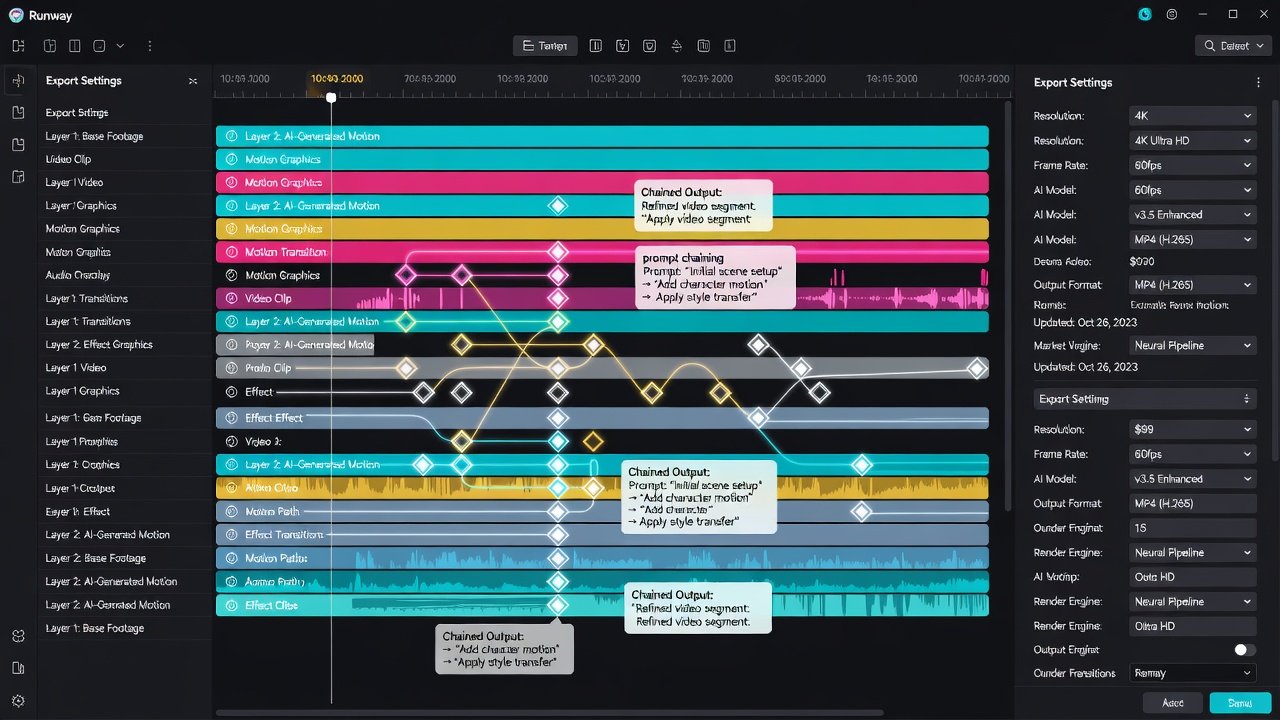
Timeline layering in Runway supports up to 12 simultaneous tracks for complex scenes, enabling intricate compositions that would be time-consuming in conventional software. Organize elements by separating foreground, midground, and background layers with independent prompts and motion parameters applied to each. This technique excels in scenes requiring synchronized actions, such as character dialogues paired with dynamic environmental interactions like moving shadows or particle effects. Advanced users often duplicate layers for subtle variations, blending them with opacity masks to achieve seamless transitions. By mastering layer hierarchies, creators gain granular control that enhances narrative depth without post-production bottlenecks.
Prompt Chaining for Narrative Depth
Prompt chaining connects sequential generations where outputs feed into subsequent prompts, maintaining visual continuity across extended sequences. Start with a wide establishing shot, then chain close-ups using descriptive continuity cues like "continuing from previous frame with consistent lighting and character positioning." This method preserves narrative coherence across edits and minimizes manual adjustments later. For longer projects, chain up to five or six generations while incorporating style references from earlier outputs to reinforce thematic consistency. The result is a more cohesive story flow that feels professionally directed rather than piecemeal.
Export Optimization for High-Quality Output
Optimize exports by selecting 4K resolution with H.265 codec and 60fps where motion demands it, ensuring compatibility with modern distribution platforms. Adjust bitrate settings to 50-80 Mbps for balanced file sizes and fidelity, and incorporate post-processing toggles for noise reduction and color grading directly in Runway before final render. Test different compression profiles on sample clips to identify settings that preserve fine details like textures and highlights. Advanced users also leverage batch export queues to handle multiple variations simultaneously, saving hours on large-scale deliveries.
Step-by-Step Cinematic Effects Examples
For a dramatic slow-motion reveal effect: 1) Generate base footage at 120fps equivalent motion. 2) Apply motion blur via advanced controls with custom keyframing. 3) Chain a prompt for atmospheric particles and lighting shifts. Another example involves creating a seamless transition between day and night scenes by chaining prompts with time-of-day descriptors while maintaining object consistency through reference images. Real-world testing shows these methods yield film-like results in under 30 minutes per shot when workflows are optimized, far surpassing earlier AI limitations. Incorporate particle systems for rain or sparks by layering dedicated motion tracks with targeted prompts describing intensity and direction.
Integrations with CapCut and Premiere Pro
Export Runway clips directly into CapCut for mobile-friendly refinements or Adobe Premiere Pro for multi-track assembly and color correction. Use XML interchange for timeline metadata preservation to keep AI-generated motion data intact during import. This hybrid workflow combines AI generation speed with traditional editing precision, as demonstrated in professional pipelines where teams alternate between tools for maximum efficiency. Additional plugins can automate file transfers, further streamlining the process from generation to final cut.
Performance Tips and Efficiency Gains
- Utilize GPU acceleration settings for 40% faster renders on compatible hardware by enabling hardware-specific optimizations in preferences.
- Batch process similar prompts to streamline repetitive tasks and reduce idle time between generations.
- Monitor system resources to avoid throttling during extended sessions by closing background applications.
- Leverage cloud rendering options for complex scenes exceeding local capacity, distributing workloads across remote servers.
- Cache intermediate frames to accelerate iterations when refining specific sections of a video.
- Pre-generate style references in advance to speed up custom model applications during active projects.
Real Creator Case Studies
Indie filmmaker Lena Torres used custom models and prompt chaining to produce a 5-minute short film in two weeks, cutting traditional production time by half while achieving a distinctive visual identity that attracted festival attention. Studio animator Marcus Hale integrated Runway layers with Premiere for a commercial campaign that achieved viral engagement through fluid motion sequences and precise lighting control. Another case involves a YouTube creator who applied timeline layering for explainer videos, resulting in higher viewer retention rates due to polished, dynamic visuals that differentiate content in a crowded niche.
Common Advanced Pitfalls to Avoid
Overtraining models leads to artifacts and reduced generalization; always validate with diverse test prompts before full deployment. Ignoring layer order causes clipping issues in timelines that require extensive fixes. Skipping export previews often results in unexpected color shifts on final delivery across different devices. Additionally, failing to back up trained models can lead to lost work if sessions are interrupted, so implement regular saves and version control practices.
FAQ on Licensing and Batch Processing
How does licensing work for trained models?
Runway grants commercial rights to outputs from trained models under standard terms, but review usage policies for third-party references to ensure compliance with copyright guidelines in your region.
What are best practices for batch processing?
Queue jobs with consistent parameters and monitor progress via the dashboard. Split large batches into smaller groups to maintain quality control and allow for mid-process adjustments based on initial results.
Can I combine multiple custom models in one project?
Yes, load several trained models into different timeline layers and blend their outputs using opacity and masking tools for hybrid styles that leverage strengths from each dataset.
Conclusion
Implementing these advanced Runway 2026 techniques elevates creator output from experimental to production-ready. Focus on iterative testing, careful integration with complementary tools, and attention to performance details to maximize results in competitive AI video workflows. Continuous exploration of new features will keep your projects at the forefront of creative possibilities.

No comments yet. Be the first!