 NeoBit Daily

Introduction to Claude 2026 for Academic and Freelance Productivity
Claude 2026 represents a significant evolution in AI-assisted research and writing, offering researchers and writers powerful tools to streamline complex tasks. This guide covers beginner to advanced techniques for building efficient pipelines, including prompt chaining, custom project configurations, citation management, and seamless integration with note-taking apps like Obsidian and Craft. By leveraging these capabilities, users can achieve substantial productivity gains in academic literature reviews, content outlining, and iterative editing processes. The platform's improved context window and reasoning capabilities make it particularly suited for handling lengthy documents and multi-step analyses that were previously challenging for earlier AI models.
Whether you are an academic compiling extensive bibliographies or a freelance writer managing multiple client projects, Claude 2026 provides structured workflows that reduce repetitive work. The focus here is on practical, actionable examples that deliver measurable improvements in output quality and speed. Users in fields ranging from social sciences to technical writing have reported cutting research time by organizing information more systematically through chained interactions.
Understanding Prompt Chaining Techniques
Prompt chaining involves breaking down complex tasks into sequential AI interactions, where each response informs the next prompt. In Claude 2026, this method excels for multi-stage research processes. Start with a broad query to gather initial data, then refine with follow-up prompts that reference prior outputs. This technique helps maintain coherence over long sessions and allows for progressive refinement of ideas.
For example, begin by prompting: "Summarize key themes from recent studies on climate policy." Follow with: "Using the themes identified, outline three potential research angles for a literature review." A third chain could request: "Expand the first angle with supporting evidence from the summaries." This chained approach ensures logical progression and maintains context across steps, minimizing hallucinations compared to single-prompt methods. Advanced users often create template chains that can be reused across similar projects, saving time on repetitive setups.
Setting Up Custom Projects in Claude 2026
Custom project setups allow users to define persistent contexts, such as uploading reference documents or establishing style guidelines. Create a dedicated project for each major research topic, uploading PDFs of source materials directly into the workspace. This enables the AI to reference them consistently throughout the workflow without needing to repeat background information in every prompt.
Step-by-step: 1. Initiate a new project and name it descriptively, such as "Urban Planning Literature 2026." 2. Upload relevant files like journal articles or notes, ensuring they are organized by subfolders if the interface supports it. 3. Set custom instructions for tone, citation style (e.g., APA), and output format, including preferences for bullet points or narrative style. 4. Test the setup with a sample query to verify context retention. These setups prove invaluable for long-term projects spanning weeks or months, as they create a stable environment for iterative development.
Handling Citations Effectively
Accurate citation handling is critical for researchers. Claude 2026 supports generating properly formatted references by instructing it to track sources from uploaded materials. Always verify outputs against originals, but use the AI to format bibliographies in bulk and suggest in-text citations based on content summaries. For complex works, chain a prompt to extract quotes first, then format them according to required styles.
Integrate with tools like Anthropic's official resources for best practices on responsible AI use in scholarly work. This ensures compliance with ethical guidelines while maximizing the tool's strengths in synthesis.
Integrating with Note Apps: Obsidian and Craft
Seamless connections to apps like Obsidian and Craft enhance Claude 2026's utility. Export AI-generated outlines directly into Obsidian for linking with existing knowledge graphs, allowing bidirectional connections between ideas. In Craft, use its database features to organize iterative drafts and embed AI outputs as structured blocks.
Practical integration example: Generate a literature review outline in Claude, then copy it into Obsidian with markdown formatting preserved. This creates bidirectional links between notes and AI outputs, fostering a dynamic research environment. For Craft users, export tables of sources and sync them for collaborative editing. Learn more at Obsidian and explore Craft at its official site. These integrations turn isolated AI sessions into part of a larger, interconnected knowledge system.
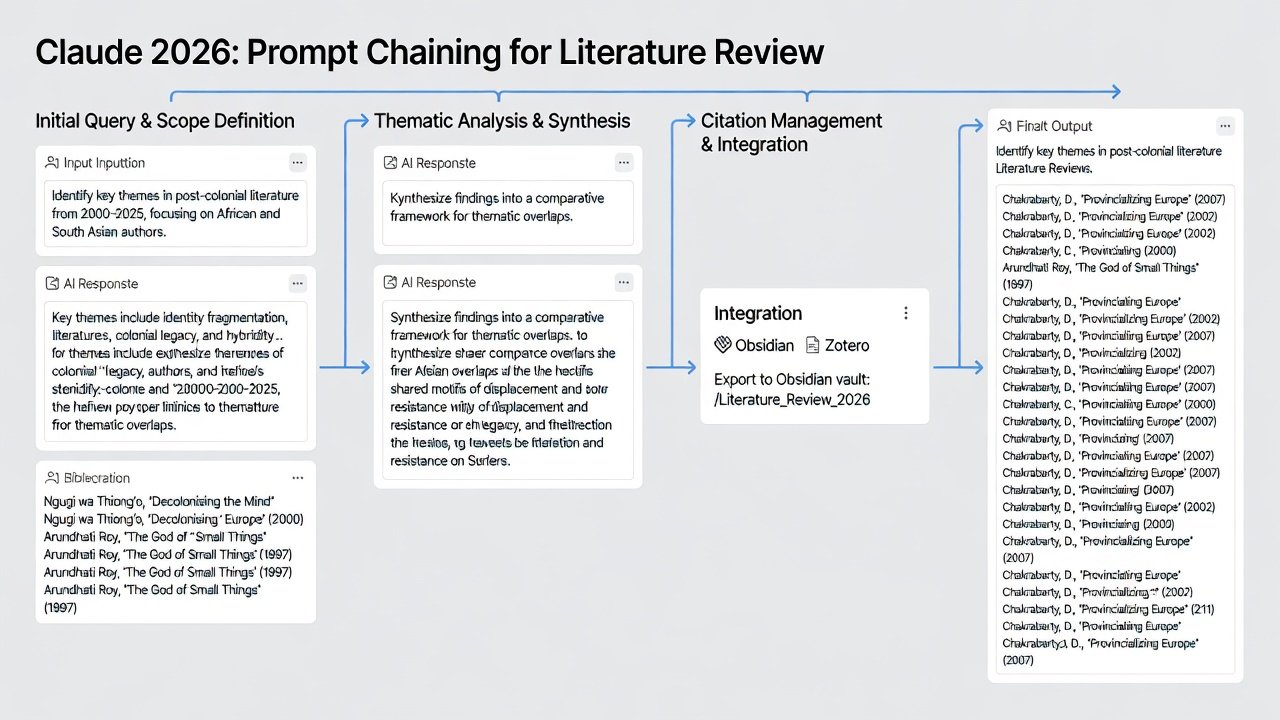
Step-by-Step Workflow for Literature Reviews
1. Upload core papers to a custom project and instruct Claude to create an initial source matrix. 2. Chain prompts to extract methodologies, findings, and limitations from each document. 3. Request synthesis into thematic sections with suggested connections between studies. 4. Iterate on gaps identified by asking for additional search term recommendations. 5. Finalize with a draft abstract and conclusion. This process typically accelerates review completion by organizing disparate sources efficiently and highlighting patterns that might otherwise require manual cross-referencing.
Content Outlining and Iterative Editing Examples
For outlining: Prompt Claude to create hierarchical structures based on research questions, then request variations for different audience levels such as expert versus general readers. Refine through multiple edits, feeding back specific feedback like "Strengthen the methodology section with examples from the uploaded sources."
Iterative editing benefits from version tracking within projects, allowing side-by-side comparisons of drafts. An example sequence might involve generating a first draft, requesting expansions on weak arguments, and finally polishing for clarity and flow. Freelance writers find this especially useful for adapting content across different publications.
Comparisons to ChatGPT
While ChatGPT offers broad accessibility and strong creative generation, Claude 2026 demonstrates superior context retention in extended chains and better adherence to custom instructions for academic rigor. Users report fewer formatting errors in citations and stronger logical consistency for research tasks. In side-by-side tests, Claude often produces more nuanced syntheses when handling contradictory sources. Choose based on specific needs: Claude for depth in writing pipelines and detailed analysis, ChatGPT for quick brainstorming or multimodal tasks. The choice depends on project demands, with many professionals using both in complementary ways.
Advanced Prompt Techniques for Enhanced Results
Beyond basic chaining, incorporate role-playing prompts such as "Act as a peer reviewer and critique this outline." Combine with constraints like word limits or required elements to guide outputs precisely. Experiment with temperature settings if available in your interface for more creative or conservative responses during different workflow stages.
Mistakes to Avoid When Using Claude 2026
- Over-relying on AI without verification, which can lead to factual inaccuracies.
- Failing to maintain clear project boundaries, resulting in context dilution.
- Ignoring privacy settings when handling sensitive research data.
- Skipping iterative refinement, which often yields the most polished results.
Practical FAQ on Accuracy and Data Privacy
- How accurate is Claude 2026 for research? It provides strong foundational outputs but always cross-verify facts with primary sources to ensure scholarly integrity.
- What about data privacy? Review Anthropic's policies for enterprise options that enhance data controls and compliance with institutional requirements.
- Can it handle sensitive academic data? Use anonymized inputs and avoid uploading confidential materials; opt for local processing features where possible.
- How does it compare in handling large datasets? The expanded context allows processing of extensive texts, but break very large inputs into manageable segments for best performance.
- Are there limits on daily usage for heavy workflows? Check current subscription tiers for usage quotas to plan intensive research sessions accordingly.
Conclusion
Implementing these Claude 2026 workflows transforms research and writing efficiency. By mastering prompt chaining, project setups, and integrations, both academics and freelancers can focus more on analysis and creativity rather than administrative tasks. Experiment with the examples provided to customize your own pipelines and continuously refine based on project outcomes for ongoing productivity improvements.

No comments yet. Be the first!