 NeoBit Daily

Introduction to Bear 2026 for Academic Research
Bear 2026 has evolved into a powerful second-brain tool for researchers handling complex literature reviews and knowledge management. This guide explores advanced features like bidirectional linking, nested tags, and sophisticated search queries to organize scholarly work efficiently. Whether managing hundreds of papers or exporting to reference managers, these strategies transform basic note-taking into a robust research workflow. Academic users often struggle with information overload when dealing with dozens of studies, citations, and cross-references. Bear 2026 addresses this by providing native support for linking, tagging hierarchies, and precise querying that scales with large collections. In this comprehensive overview, we will walk through practical implementations drawn from real research scenarios, such as preparing systematic reviews or maintaining ongoing project databases. By the end, you will have actionable steps to build a resilient note system that supports both daily reading and long-term synthesis.
Building Bidirectional Links for Literature Reviews
Bidirectional links in Bear 2026 create a web of interconnected notes, essential for tracing citations and themes across studies. Start by typing [[Note Title]] to create a link. For example, link a paper summary on climate models to your methodology notes. This enables quick navigation and reveals relationships that linear documents miss. Researchers benefit because backlinks automatically surface related content, reducing the time spent hunting for connections during writing or revision phases.
Step-by-step tutorial: 1. Open a literature note. 2. Highlight key concepts and use the link syntax. 3. Bear automatically generates backlinks at the bottom of the target note. 4. Review the backlink section regularly to identify emerging patterns. In practice, a researcher studying renewable energy can link solar panel efficiency studies to battery storage analyses, forming a dynamic knowledge graph. Another example involves connecting theoretical framework notes to empirical results from multiple experiments, allowing instant jumps between hypothesis and data. This approach mirrors citation networks found in academic databases but keeps everything within your personal workspace for faster iteration.
Real Academic Workflow Example
Imagine preparing a review on machine learning in healthcare. Create a central hub note titled 'ML Healthcare Review'. Link individual paper notes here. Each linked note includes summaries, quotes, and critiques. Over time, this structure supports rapid synthesis during writing phases. Expand the workflow by creating sub-links between methodology notes and limitation discussions, ensuring that when you revisit a concept like model bias, all related critiques appear automatically. This method has proven effective for PhD candidates managing thesis chapters alongside journal submissions.
Using Nested Tags for Precise Organization
Nested tags extend beyond flat keywords. Use syntax like #Literature/2025/PeerReviewed to categorize by year and type. This hierarchy aids filtering during large-scale reviews. Combine with #Method/Quantitative for cross-cutting searches. Nested structures prevent tag sprawl and make it simple to drill down from broad categories to specific items. For instance, a medical researcher might maintain #ClinicalTrials/PhaseII alongside #DataAnalysis/StatisticalMethods, enabling quick isolation of notes relevant to a particular study phase.
- Tag papers by discipline: #Biology/Genomics or #ComputerScience/NLP to group interdisciplinary work
- Track progress: #Status/ToRead, #Status/Analyzed, #Status/Drafted to monitor pipeline movement
- Group by project: #Project/Thesis2026 or #Project/GrantProposal to separate concurrent efforts
- Include source type: #Source/JournalArticle versus #Source/Preprint for quick credibility checks
Regular audits of your tag tree help maintain consistency across months of accumulated notes.
Advanced Search Queries for Efficient Retrieval
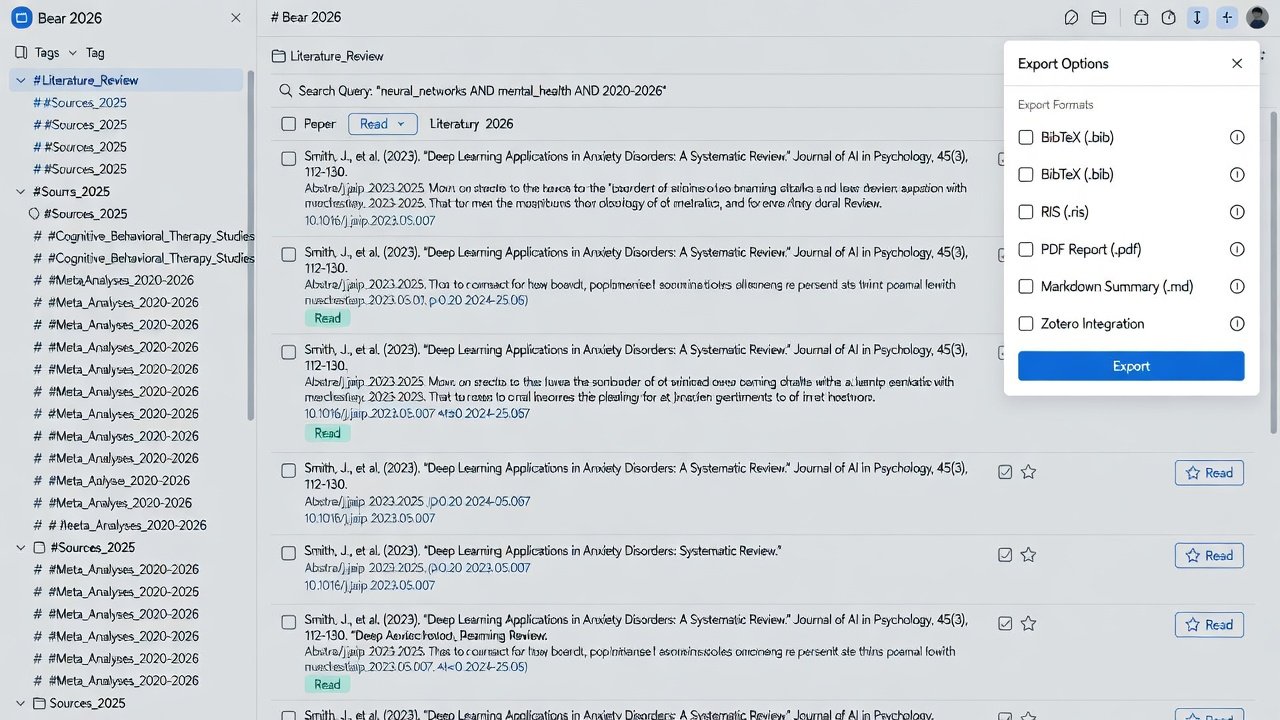
Bear 2026 supports powerful queries combining tags, dates, and text. Example: tag:#Literature/2025 AND created:>2025-09-01 retrieves recent peer-reviewed notes. Use OR for broader sweeps or -tag to exclude items. Researchers can query for specific authors or keywords within linked notes. Advanced users combine multiple conditions such as tag:#Method/Qualitative AND content:"thematic analysis" to surface methodological discussions. Another practical query is tag:#Project/Thesis2026 -tag:#Status/Archived, which excludes completed work while focusing on active files. These queries integrate seamlessly with Bear's sidebar filters, allowing saved searches to become reusable smart folders. Over repeated use, this capability dramatically cuts down retrieval time compared to manual scrolling through hundreds of notes.
Exporting Research Notes: Formats and Strategies
Exporting is critical for collaboration and publication. Bear supports multiple formats with varying fidelity for academic use. Choosing the right format depends on the downstream tool and audience. PDF exports suit committee reviews where visual layout matters, while Markdown preserves editability for version-controlled repositories.
Comparison of Export Formats
- PDF: Preserves formatting and images ideal for sharing annotated reviews. Best for final reports but less editable. Customize margins and include page numbers for professional output.
- Markdown: Retains links and structure for version control or conversion to other tools. Highly flexible for integration with publishing pipelines. Supports conversion scripts to LaTeX or HTML when needed.
- Zotero Integration: Export notes as references with metadata. Sync highlights and annotations directly into your library for citation management. This format maintains traceability from notes to bibliography entries.
Step-by-step for Zotero export: Select notes, choose export, map fields to Zotero items. For PDF, customize page layouts to include headers with note titles and dates. Markdown exports can be batch-processed to strip internal links before sharing with co-authors who do not use Bear. Always test a small subset first to verify formatting integrity.
Performance Tips for Large Note Collections
With thousands of notes, optimize by archiving completed projects and using smart folders. Regularly consolidate duplicate tags. Enable cloud sync selectively for active research only to maintain speed. Additional tactics include breaking massive hub notes into smaller linked components and running periodic searches for orphaned notes that lack connections. These practices keep the app responsive even when collections exceed several thousand entries, preventing slowdowns during intensive literature review periods.
Recommended Plugins and Integrations
Enhance Bear with community plugins for citation parsing and reference imports. Pair with Zotero for seamless bibliography handling and explore Bear's official site for latest updates on integrations. Consider linking to arXiv for preprint ingestion workflows that automatically generate note templates.
FAQ: Syncing and Organization Challenges
Q: How do I resolve sync conflicts across devices? A: Use Bear's conflict resolution tool and avoid simultaneous edits on multiple machines. Q: Best way to organize 500+ literature notes? A: Implement nested tags and weekly review sessions to prune and link. Q: Can exports include images and tables? A: Yes, PDF and Markdown exports preserve embedded media when configured properly. Q: What happens if a link breaks after renaming a note? A: Bear updates references automatically in most cases, but manual verification is recommended for critical hubs. Q: How to handle collaborative editing without losing structure? A: Export Markdown versions for shared drives while keeping the master collection in Bear.
Conclusion
Implementing these advanced strategies in Bear 2026 elevates research productivity. From linked literature webs to optimized exports, the app becomes indispensable for academics seeking organized, export-ready knowledge bases. Consistent application of these techniques yields compounding benefits over the course of multi-year projects.

No comments yet. Be the first!