 NeoBit Daily

Introduction to 2026 OS Updates in DevOps
DevOps teams face increasing pressure to incorporate the latest operating system updates without interrupting continuous integration and continuous deployment workflows. The 2026 OS releases introduce enhanced security protocols, kernel optimizations, and cloud-native features that demand careful embedding into existing pipelines. This guide provides advanced strategies for DevOps engineers to achieve seamless integration.
Key Challenges with 2026 OS Updates
Compatibility issues often arise when legacy applications interact with new kernel versions or updated libraries in 2026 OS releases. Downtime risks escalate during patching windows, especially in hybrid cloud setups spanning on-premises and multi-vendor environments. Additional concerns include dependency conflicts with container runtimes and potential performance regressions in automated testing suites.
Step-by-Step Integration Using Ansible, Jenkins, and Terraform
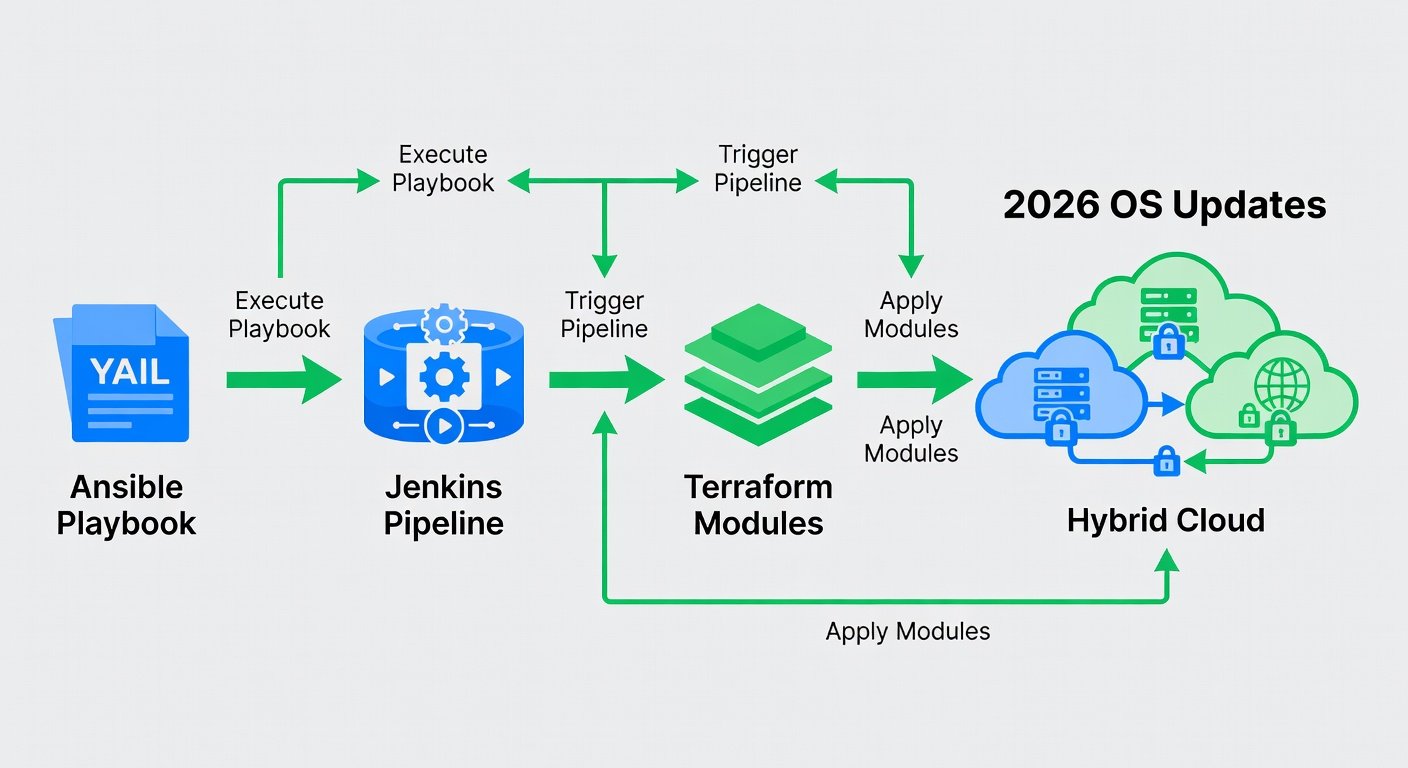
Begin by modeling infrastructure as code with Terraform to provision environments that support 2026 OS images. Define variables for OS versions and apply them across staging and production clusters. Next, leverage Ansible playbooks to orchestrate the actual update process. A sample YAML snippet for an Ansible role handling OS upgrades looks like this:
- name: Update to 2026 OS
  ansible.builtin.package:
    name: kernel
    state: latest
  notify: reboot system
Integrate these tasks into Jenkins pipelines for automated triggering. Use Jenkins declarative syntax to stage updates with approval gates before production rollout.
Comparing Automation Frameworks: Puppet vs Chef
Puppet excels in declarative configuration management with strong reporting for large-scale 2026 OS deployments, making it ideal for compliance-heavy environments. Chef offers more imperative flexibility through Ruby-based recipes, suiting teams needing custom logic for complex hybrid-cloud rollouts. Evaluate based on team expertise: Puppet reduces scripting overhead while Chef provides granular control over update sequences.
Real-World Case Studies from Recent Patches
Organizations that adopted phased rollouts for 2026 kernel patches reported zero unplanned downtime by combining Terraform drift detection with Ansible idempotency checks. One financial services firm successfully updated 500 hybrid nodes using GitHub Actions workflows that triggered automated testing on each patch.
Best Practices for Pre-Update Testing and Automated Rollbacks
Always conduct blue-green deployments to validate 2026 OS updates in isolated environments first. Implement automated rollback mechanisms via Terraform state management and Ansible handlers that revert changes on failure detection. Monitor key metrics such as boot times and service availability post-update.
GitHub Actions Workflow Example
Here is a practical GitHub Actions workflow for orchestrating updates:
name: 2026 OS Update Pipeline
on: [push]
jobs:
  update:
    runs-on: ubuntu-latest
    steps:
      - uses: actions/checkout@v4
      - name: Apply Terraform
        run: terraform apply -auto-approve
      - name: Run Ansible
        run: ansible-playbook update-os.yml
FAQ on Handling Failed Updates Across Hybrid Clouds
- How do I diagnose a failed 2026 OS patch? Review Ansible logs and Terraform plan outputs for dependency mismatches.
- What rollback strategy works best? Use versioned images and automated state restoration via Terraform.
- Can updates be applied to mixed OS versions? Yes, with conditional Ansible tasks targeting specific inventory groups.
Conclusion
By combining infrastructure-as-code tools with robust testing and rollback procedures, DevOps teams can integrate 2026 OS updates seamlessly. Follow the outlined steps, leverage comparisons between frameworks, and apply the provided configurations to maintain pipeline integrity and operational resilience. For further reference, consult official documentation from Ansible, Terraform, and Jenkins.
No comments yet. Be the first!